
【SCP】Unable to import SSL cert to SCP 6.1.0
Issue Description
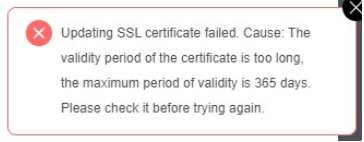
Unable to import SSL cert to SCP 6.1.0 due to error "Validity period of the certificate is too long".
Error/Warning Information
Handling Process
-
SCP only support to upload the SSL cert that the validity period less than 1 years (365days).
-
If the validity period is more than 1 year, it is required to modify from backend source code to increase the limitation.
-
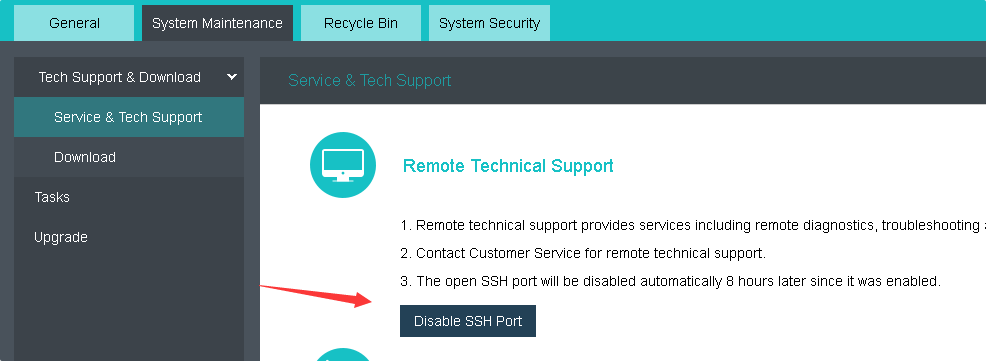
Make sure the SSH port is enable on SCP. Then, use account "root" with port "22345" to access backend.
-
Modify the source code.
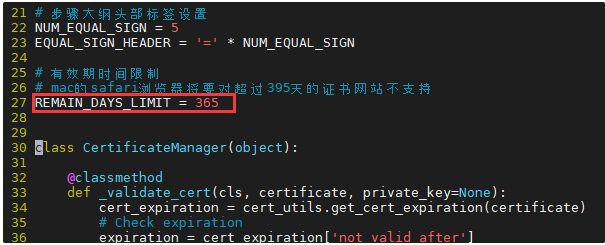
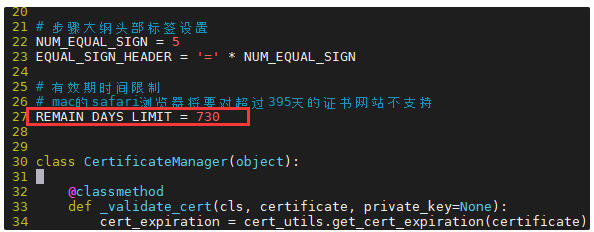
Command: "vim /usr/lib/python2.7/site-packages/cert_manager/manager.py +27" -
Change the "REMAIN_DAYS_LIMIT" value to a appropriate days or based on user requirement.
Before:
Only support 365 days (1 Year)
After:
Now support 730 day (2 Year)
-
Ensure there is no task running on SCP, then restart the portal-api services.
Command: "systemctl restart portal-api.service" -
Now, SCP able to upload SSL cert which has more than 1 year validity period.
Root Cause
SCP only support SSL cert that less than 1 year validity period due to security concerns and the safari browser changes stated in Suggestion.
Solution
Backend modify source code.
Suggestions
Please be aware, MAC safari browser does not support the SSL cert which have validity period more than 13 months.
You might refer to:
https://mp.weixin.qq.com/s/v5zGwu-L6-jse61o0wmOtg