
[aCMP] Error in creating nfv device: The ineffective nodes include nodes with insufficient configuration information
Problem Description
In the newly built aCMP control environment, an error will be reported when creating NFV devices: The ineffective nodes include nodes with insufficient configuration information. Please configure these nodes (select the nodes and configure them in the details on the right) or delete them and then create them.
Root cause
After adding a Cluster aCMP, the storage performance selection is empty by default, and the storage cannot be read or written, so it cannot be created. Different options correspond to different advantages, as detailed below:
Empty: Do not configure storage performance
High-performance storage: has strong read and write performance and is used to create high-performance Virtual Machine. This Tag Medium given to SSD SC
Performance storage: has strong read and write performance, but is relatively old. Usually old storage
Capacity Sensitive Storage: Fair I/O speed with high capacity, security, and cost-effectiveness.
solution
In the Cluster management interface of aCMP, click More, select the Storage Performance option, change the storage performance to High-Performance Storage Mode, and click Take Effect Immediately in the Topology Interface. At this time, creating NFV devices again can be executed normally.
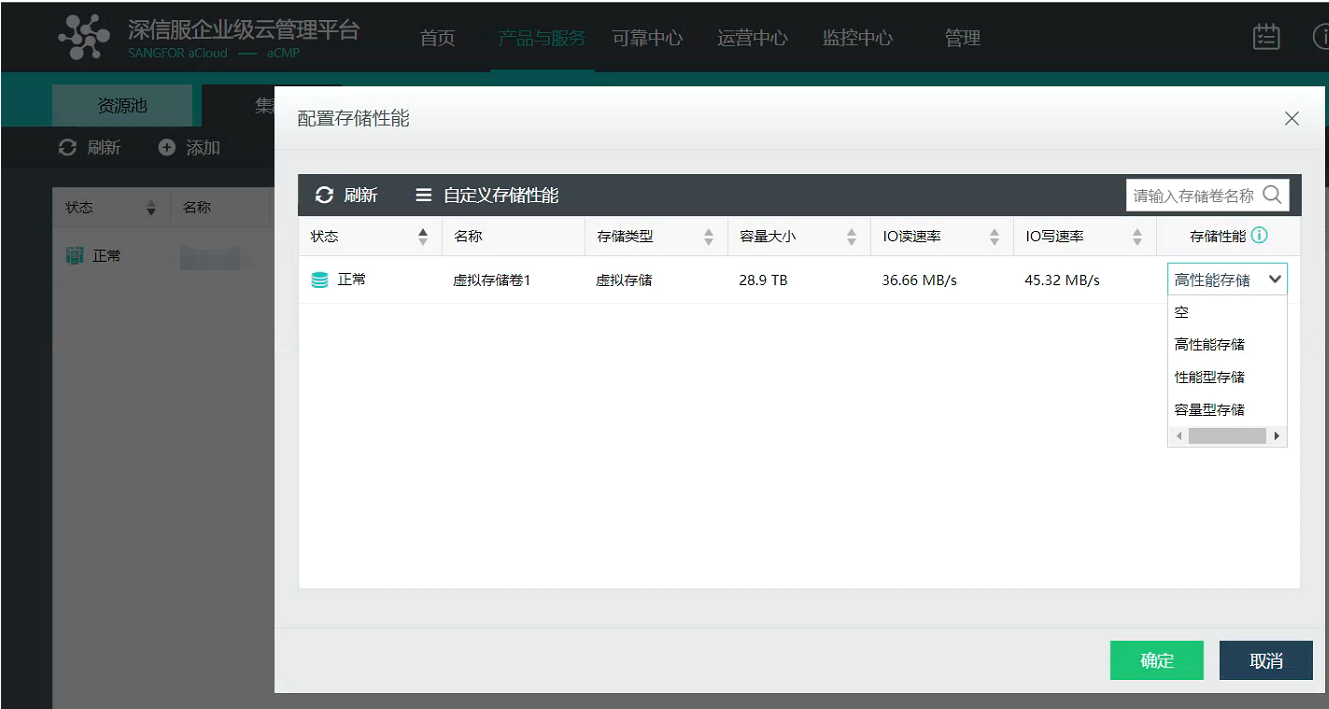
58445ed5fb1144cca.png (225.77 KB)
Suggestions and Conclusion
The storage mode of the Cluster needs to be selected correctly according to needs.
Original Link
https://support.sangfor.com.cn/cases/list?product_id=36&type=1&category_id=19475&isOpen=true