
[SCP] Clear Advanced Component License (aGPU, aSI, etc.)
Issue Description
In scenarios where the license is switched from POC to a sales license, some advanced modules (e.g., aGPU, aSI) are not purchased. In this case, the license will be expired and the alarms triggering daily, which can be annoying for the customer.
Handling Process
This is only applicable for SCP licensing, for standalone HCI licensing, please contact TAC.
- Login to SCP and revoke the license of the HCI.
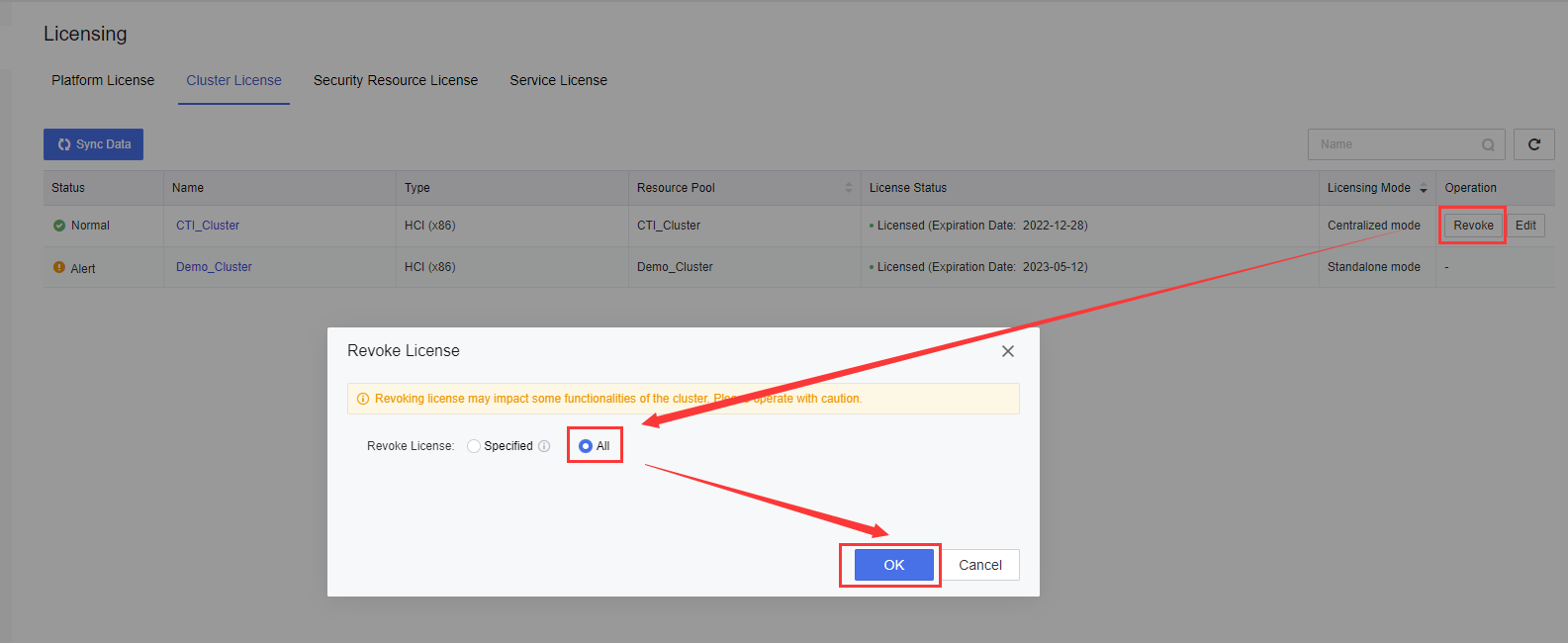
- Login to HCI backend and Create a new directory under /sf/data/local/ and copy the files into this directory.
Command:mkdir /sf/data/local/snbak/; cp /cfs/priv/sn/vls_authorize_client /sf/data/local/snbak/; cp /cfs/asv_sn.info /sf/data/local/snbak/;cp /cfs/priv/sn/authinfo.module /sf/data/local/snbak/;cp /cfs/priv/sn/vls_client_authinfo_file /sf/data/local/snbak/;

- Stop the services and remove the specific files which already made a copy.
Command:
/sf/etc/init.d/authorize_client stop; rm -f /cfs/priv/sn/vls_authorize_client; /sf/etc/init.d/authorize_client start; /sf/etc/init.d/vtsn_server stop; rm -f /cfs/asv_sn.info; rm -f /cfs/priv/sn/authinfo.module; rm -f /cfs/priv/sn/vls_client_authinfo_file; /sf/etc/init.d/vtsn_server start; - Login to SCP and relicense the HCI cluster.
Root Cause
License info leftover.
Solution
Clear the authorization in backend.
Note: Clearing the authorization might affect the NFV.