
[SCP] Cluster status is abnormal. When editing Cluster connection, the prompt “Authentication failed”: Cloud management platform has not been set up yet” appears.
Problem Description
SCP Cluster list, abnormal Cluster status, edit Cluster password, prompt, Cluster authentication failed, cloud management platform has not been set up;
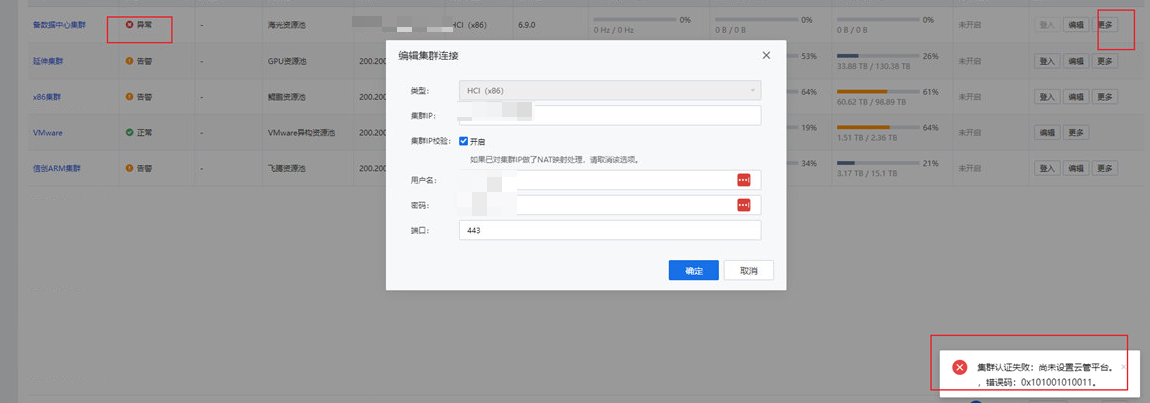
Warning Information
None
Effective troubleshooting steps
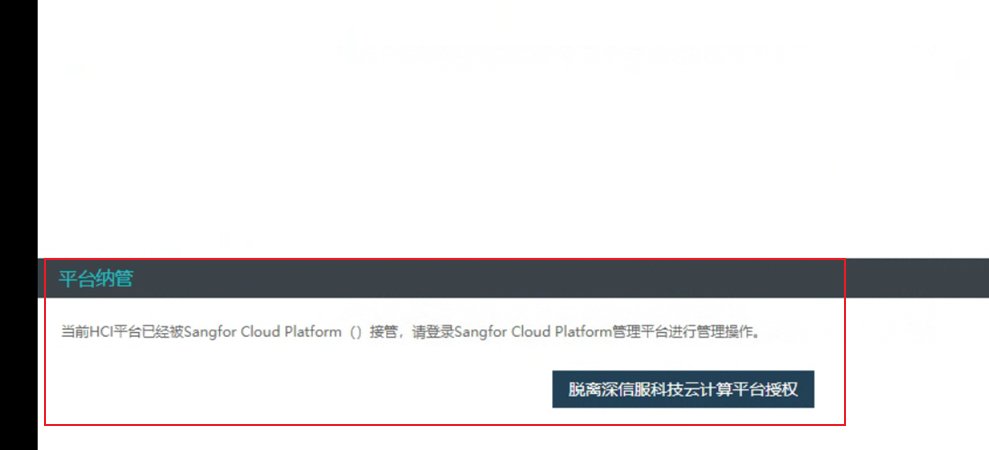
- Log in to the abnormal HCI and check the Cluster management status in Cluster management;
It may be displayed as shown below or there may be no management information
Root cause
HCI is no longer managed by SCP
solution
You can try to modify the /cfs/acenter.json file in the HCI backend to see if it can be repaired; if it does not work, you need to delete the Resource Pool and cluster on SCP (for deletion, refer to Delete Anyway Resource Pool case https://support.sangfor.com.cn/cases/list?product\_id=36&type=1&category\_id=26854) and add them again;
Original Link
https://support.sangfor.com.cn/cases/list?product_id=36&type=1&category_id=27013&isOpen=true