
[SCP] Failed to enable Virtual Machine security protection, prompt: Failed to enable security capability
Problem Description
Failed to enable Virtual Machine security protection, prompt: Failed to enable security capability, failed to modify Virtual Machine security protection component password
Effective troubleshooting steps
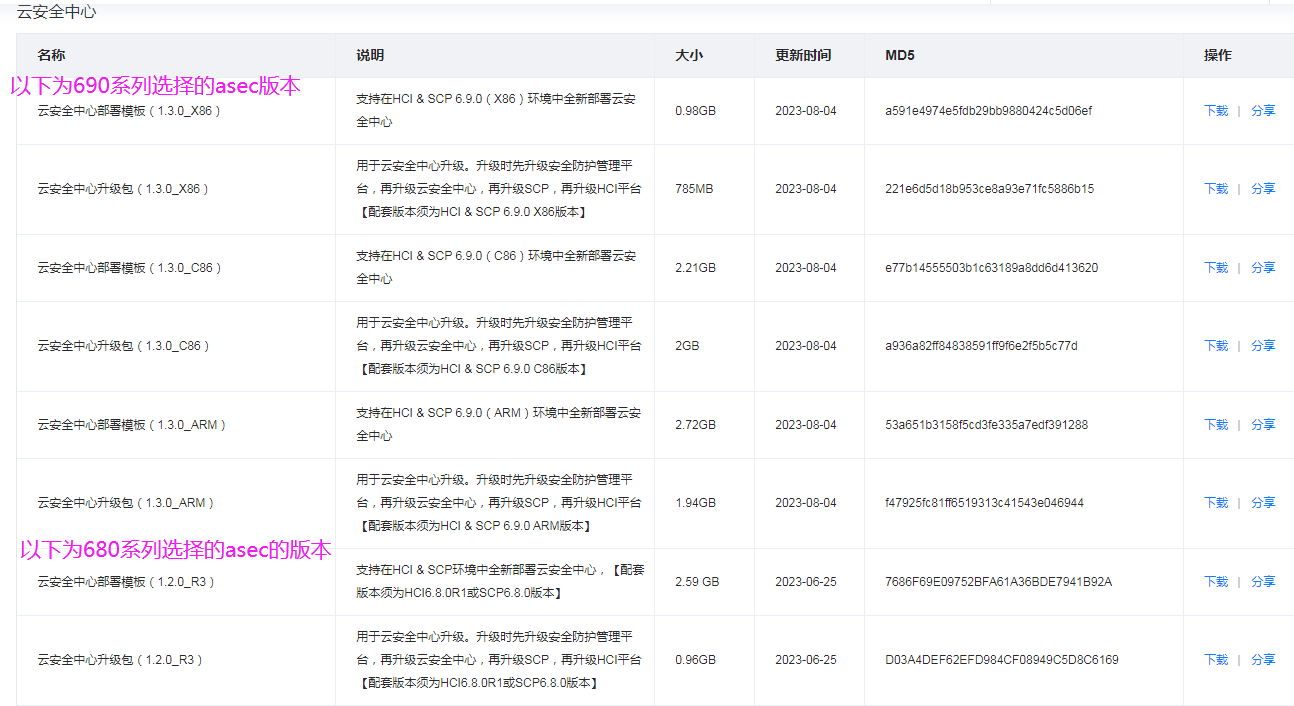
Confirm the consistency of HCI/SCP and asec versions, as well as cloud security edr versions
Root cause
The asec version selection is wrong (the current version is SCP&HCI6.8.0, and the asec1.3.0 version is selected)
solution
Close the connection between SCP and the previous asec, and import the image of asec1.3.0 to complete the connection
Suggestions and Conclusion
Original Link
https://support.sangfor.com.cn/cases/list?product_id=36&type=1&category_id=25052&isOpen=true