
SCP failed to upload certificate with validity more than 365 days
Issue Description
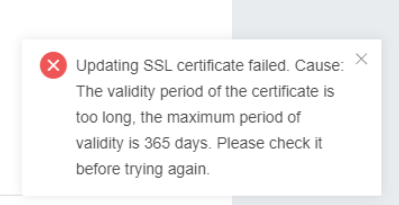
Customer have certificate with validity more than 365 days but failed to import the certificate to SCP
Error/Warning Information
Handling Process
1.Verify the SCP version, if the version is 6.3.0 and above, follow the step below(Else can continue from step5).
2.Upload the manager.py file to /home/ directory.
3.Backup the original manaher.py file with command cp /usr/lib/python2.7/site-packages/cert_manager/manager.py /usr/lib/python2.7/site-packages/cert_manager/manager.py.bak
4.Replace the file using mv /home/manager.py /usr/lib/python2.7/site-packages/cert_manager/manager.py.
5.Use command
vim /usr/lib/python2.7/site-packages/cert_manager/manager.py to edit the file.
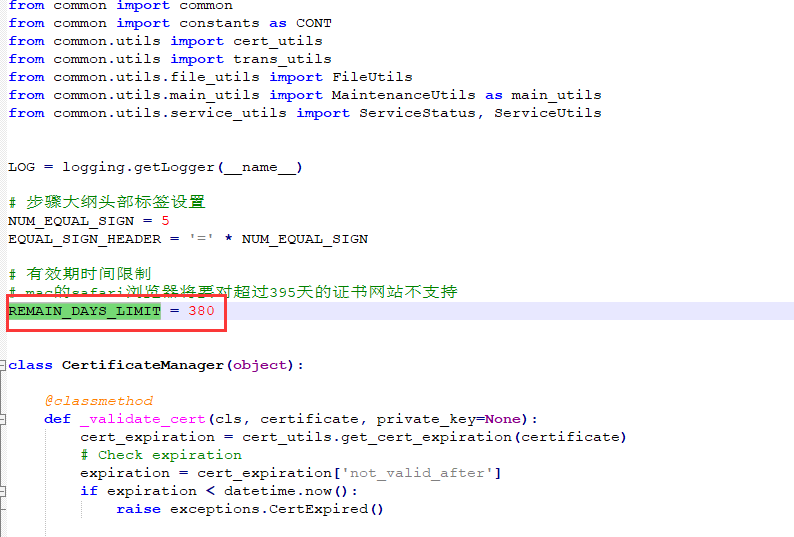
6.Find REMAIN_DAYS_LIMIT and change the value from 365 to the value of the certificate validity, then save the file.
7.Restart portal service using command systemctl restart portal-api.service.
Note: Before restart portal services, need to make sure there is no task running.
Root Cause
It is a restriction on SCP.
Solution
Change the manager.py parameter in backend.
Suggestions
This KB only for certificate validity more than 365 but less than 398 days due to security concerns.
For certificate validity longer than 398 days, please consult for custom patch instead.