[SCP] Total cores available is less than actual usage
Issue Description
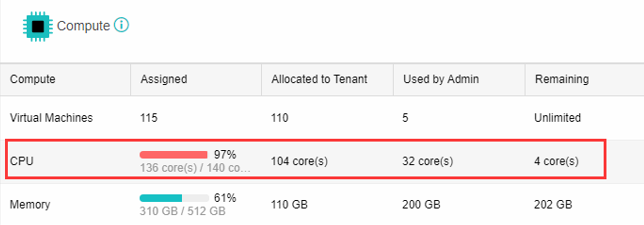
User feedback that total VM only used 32cores, but SCP showing 4 cores remaining out of 140 total cores.
VMs had only used 32cores, so why does the remaining cores is only 4 cores?

Error/Warning Information
Creating new VM only allow another 4 cores.
Handling Process
If we look on the table below, we can see that total cores available to use is 140.
104 cores has been allocated to tenant users. (Not shared)
So 140cores – 104cores (this core is allocated to the selected tenants) – 32cores (VMs deployed by admin) = 4 cores remaining
Root Cause
Misunderstanding on the configuration.
Solution
- You may remove the allocated cores from the tenant users if not being used.
- You may increase the quota limit.
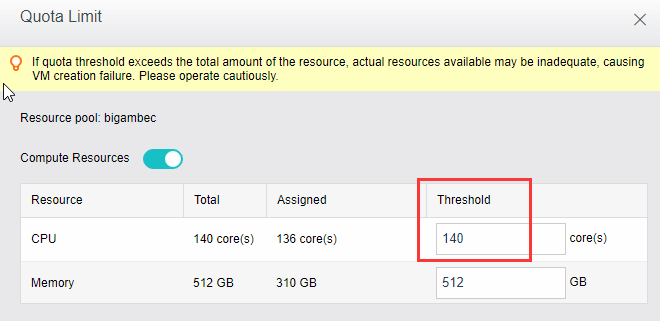
Note: Technically 140 cores is the total available cores for usage. In most cases, VM does not run at full load and the threshold can be increased (to share unused resourse). But please note that if more VMs are provided, the server is over-allocated. This means that, if all VMs run at full load, their CPUs will battle for resources, resulting in the performance degradation of VMs.
Suggestions
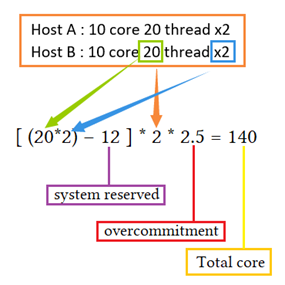
An example on how to calculate the total cores in a cluster.