
[SCP] Virtual network device secondary Licensing prompts insufficient Licensing
Problem Description
In Topology, I authorized vAF. For the first time, I selected bandwidth Licensing, but did not select other Licensing. I re-entered the Licensing interface. When I re-authorized, an alarm prompted that the current Licensing type (100Mbps throughput) was insufficient and could not be Licensing. Please change the hardware configuration or upgrade the License Key.
Warning Information
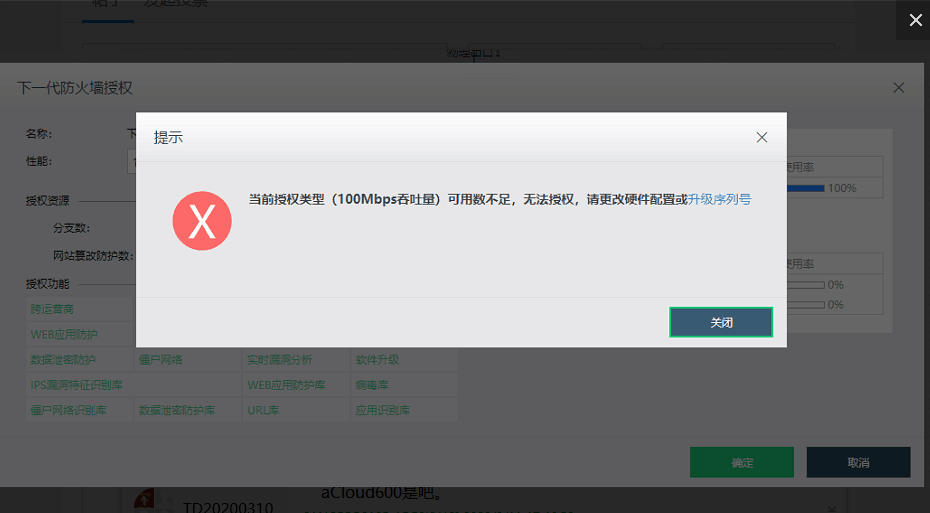
Effective troubleshooting steps
- Check the authorization that the platform gives to vaf and find that there is only one 100M Licensing
- The bandwidth Licensing was already authorized when the file was saved for the first time. However, when the authorization is clicked again and the 100M bandwidth authorization is selected in the performance Licensing, it will prompt that Licensing is insufficient. The original Licensing cannot be reset at present.
- [High-risk operation] Back up the vAF configuration first, delete the vAF, and empty the Recycle Bin (note that the Recycle Bin needs to be Revoke, otherwise the Licensing will not be recovered). After the authorization is Revoke, redeploy a vAF and re-authorize it.
Root cause
Product bug. After the first Licensing, the previously authorized data cannot be Reset when entering the Licensing interface. This problem has been solved in version 6015.
solution
In versions prior to 587R1, you can Revoke Licensing in the Licensing interface. In versions 587R1 and later, you need to completely delete NFV to Revoke Licensing. In the current version 6.0.0R3, you can only delete vAF and redeploy vAF after Licensing is Revoke.
Original Link
https://support.sangfor.com.cn/cases/list?product_id=36&type=1&category_id=19472&isOpen=true