
Create an image registry credential secret for the http protocol on the interface
Description
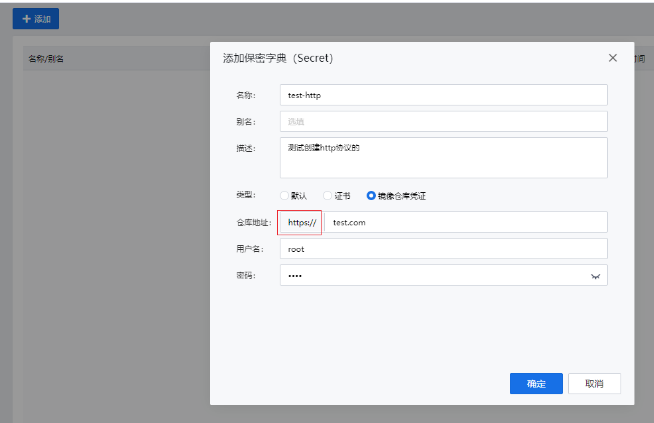
For safety considerations, the interface only supports creating image registry credentials for the https protocol, but some customers have a need to use the http protocol.
Alert Information
None
Effective Troubleshooting Steps
None
Root Cause
Design issue, not compatible with common customer scenarios
Solution
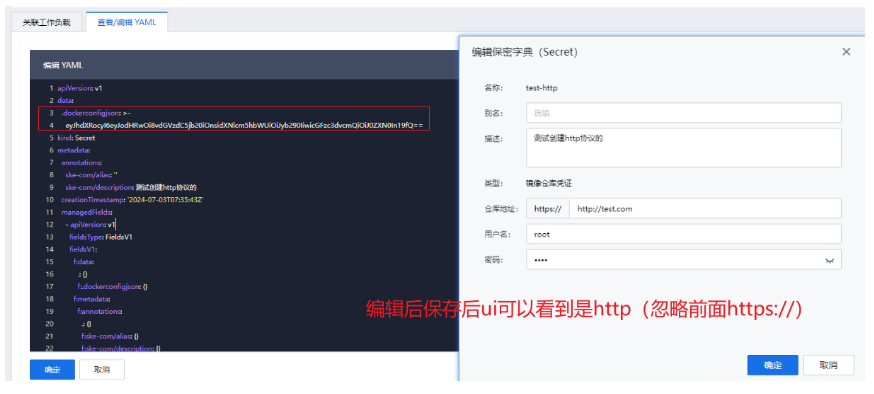
First, create one with https, then open this secret, click on edit yaml-》copy the content of .dockerconfigjson and decode it using base64 -》modify https to http and fill it back in -》save it.
- You can refer to the method below: echo "eyJhdXRocyI6eyJodHRwczovL3Rlc3QuY29tIjp7InVzZXJuYW1lIjoicm9vdCIsInBhc3N3b3JkIjoidGVzdCJ9fX0=" | base64 –decode | sed 's/https/http/g' | base64 | tr -d '\n'
- Get the output eyJhdXRocyI6eyJodHRwOi8vdGVzdC5jb20iOnsidXNlcm5hbWUiOiJyb290IiwicGFzc3dvcmQiOiJ0ZXN0In19fQ== and fill it back into the configuration.
Scope of Impact
None
Is This a Temporary Solution
Yes
Recommendations and Summary
- After modifying it via yaml, viewing this secret in the interface may show https:// http://xxxx.com as normal, and there's no need to worry about it. In the future, modifications to this secret should be made through yaml.
Investigation Content
None
Original Link
https://support.sangfor.com.cn/cases/list?product_id=37&type=1&category_id=27851&isOpen=true