
Creating a k8s cluster reports an error: Cluster quota usage failed
Description
When the user attempts to create a cluster, an error occurs indicating that the quota allocation for the cluster has failed.
Alarm Information
An error occurs when the user tries to create a cluster, with a message indicating that the quota allocation for the cluster has failed.
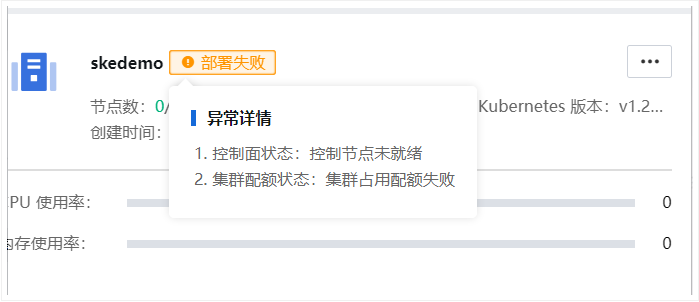
Effective Troubleshooting Steps
-
Private Cloud Environment:
- Log in to the private cloud management console.
- Navigate to the permission management module.
- Select the
adminuser. - Configure the SCP policy to ensure that
vCPUresources are authorized.
-
Hosted Cloud Environment:
- Log in to the hosted cloud's SCC.
- Navigate to the tenant management module.
- Select the tenant node that requires authorization.
- Configure the appropriate authorization strategy to ensure
vCPUresources are authorized.
Root Cause
The quota was not correctly configured, resulting in the cluster creation failure.
Solution
-
Private Cloud Environment:
- Log in to the SCP backend.
- Check if Kubernetes Engine (SKE) is authorized under admin account → System Management → Platform Authorization.
- Check if Kubernetes Engine (SKE) has been allocated
vCPUunder admin account → System Management → Service Authorization. - Review whether the resource quota has been given in User and Access Management.
-
Hosted Cloud Environment:
- Log in to the hosted cloud's SCC.
- Select the corresponding tenant under system settings and authorize the tenant's nodes.
Impact Scope of Operation
NA
Is it a Temporary Solution
NA
Suggestions and Summary
Proper authorization numbers should be considered in both private and hosted cloud environments.
Troubleshooting Content
NA
Original Link
https://support.sangfor.com.cn/cases/list?product_id=37&type=1&category_id=28639&isOpen=true