
Failure to delete the image when deleting a software package will cause failure to upload the same version of the software package again
Problem Description
When deleting a package, if there are issues such as image deletion failures during the pre-cleanup process, a configmap for that version of the package may remain, leading to failure when uploading the same version of the package next time.
Alert Information
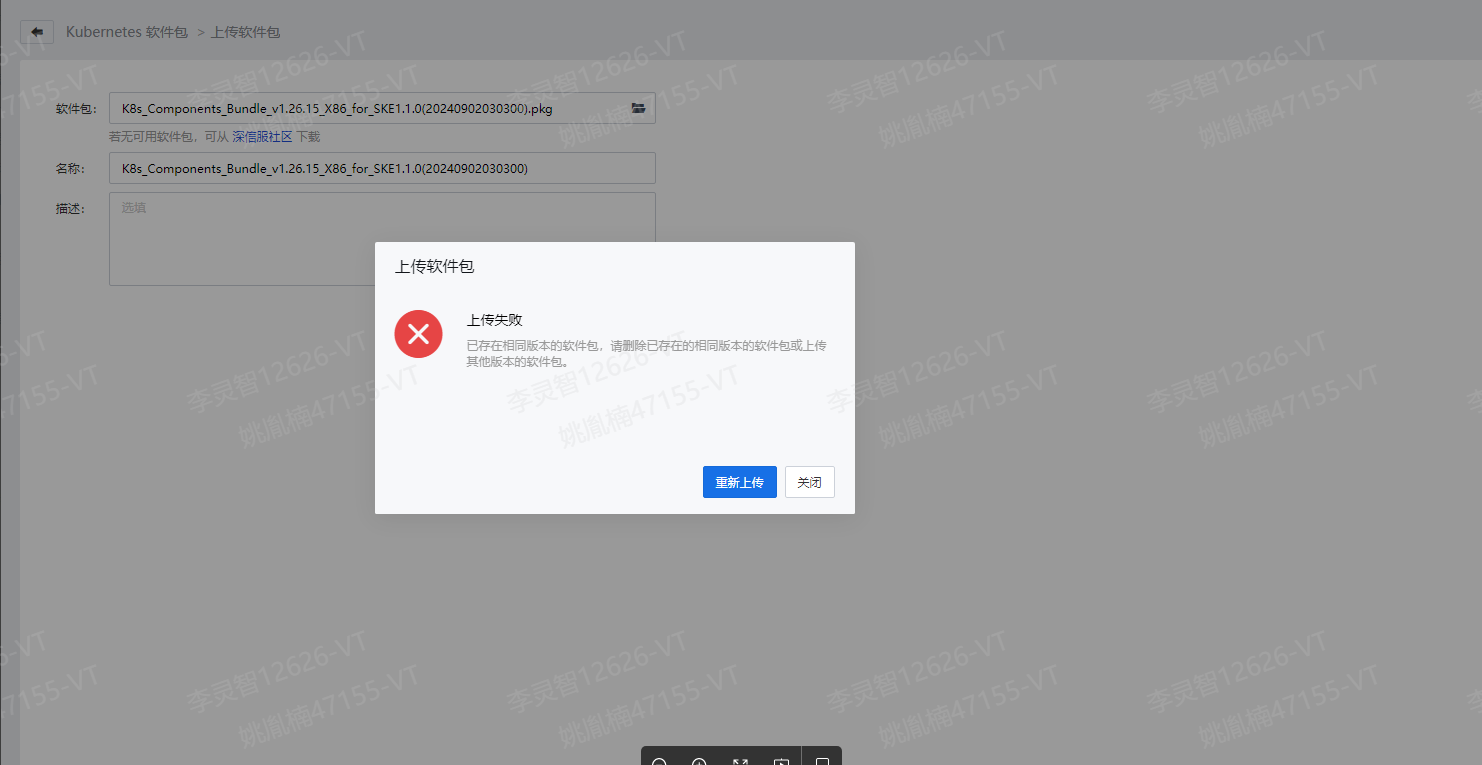
The frontend displays a message indicating that a package of the same version already exists, but the UI does not show the package, making it impossible to proceed with deletion.
Effective Troubleshooting Steps
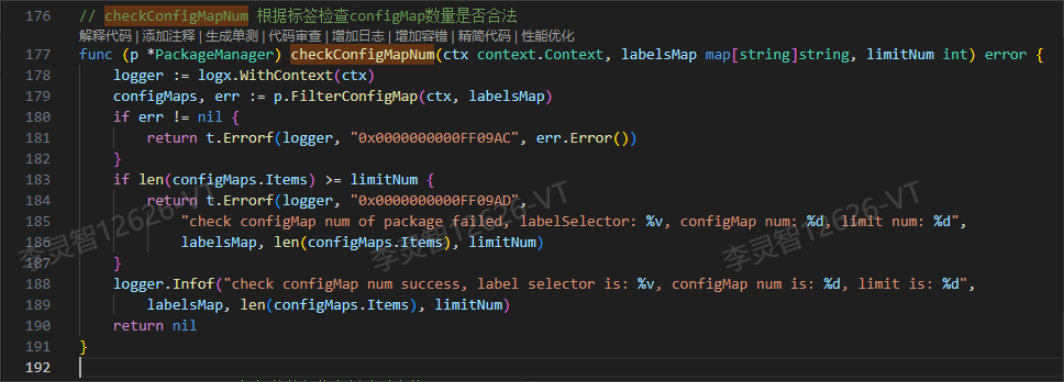
When uploading a package, the system checks whether there is a configmap with the same label version. Only one configmap of the same version is allowed, serving as the basis for ensuring no conflicts for the same version of the package.
Check the sys-api logs:

Check the number of configmaps for errors; the corresponding code:
The reason for the leftover configmap after deleting a package is that the deletion of the package first attempts to delete related images. Each step retries five times; if any retry fails, it reports an error and does not execute the subsequent logic.
Some images fail to delete five times (coredns:v1.9.3) and some fail once (kube-proxy:v1.25.16), while others fail three times (coredns:v1.8.6).
The error reported by the outer call 0x00000000000D0CFC appears three times, corresponding to three images that failed to delete five times, with coredns:v1.9.3 failing twice and coredns:v1.8.6 failing once.
If any image deletion attempt fails five times, err is not nil, which causes the function to return directly without executing the subsequent deletion of the configmap.
Furthermore, the following scenarios can lead to incomplete execution of subsequent processes, resulting in leftover configmaps:
- Failure to retrieve the configmap.
- Failure to create the ulog for deletion.
- Failure to prepare for the deletion of the configmap.
- Failure to obtain the package information.
- Failure to delete the image.
Root Cause
A leftover configmap for the same version of the software package.
Solution
Delete the configmap for the specified version package from the backend:
For instance, if a package with the name [K8s_Components_Bundle_v1.24.17_X86_for_SKE1.1.0(20240902030300)] is deleted from the UI but still not displayed, and a configmap remains in the backend, you can use the command to check if the problem exists, and then delete the configmap.
Steps:
-
View the K8s software package version, for example, if the software package name is [K8s_Components_Bundle_v1.24.17_X86_for_SKE1.1.0(20240902030300)], then the K8s software package version is k8s-package-version=v1.24.17.
-
Check the SKE version, which can be seen in [SCP/Kubernetes Engine (SKE)/Settings/Kubernetes Engine (SKE) Upgrade], such as [Current Version: SKE1.1.0-2024-09-03_02:44:02], then the SKE version is ske-version=v1.1.0.
-
Obtain
sangfor.com/version, with the format as${k8s-package-version}-ske.${ske-version}, i.e.,sangfor.com/version=v1.24.17-ske.v1.1.0. -
View the configmap with the same version label in the SKE backend:
$ kubectl get configmap -l sangfor.com/type=K8S,sangfor.com/version=v1.24.17-ske.v1.1.0 -n default NAME DATA AGE k8s-package-5fbcbbf2-8edb-493b-a0d4-17d62a8b6d2f 1 19h -
Delete the leftover configmap:
$ kubectl delete configmap -l sangfor.com/type=K8S,sangfor.com/version=v1.24.17-ske.v1.1.0 -n default configmap "k8s-package-5fbcbbf2-8edb-493b-a0d4-17d62a8b6d2f" deleted -
Re-upload the K8s software package from the UI.
Impact Scope
Deleting the leftover configmap for the K8s package.
Is it a Temporary Solution?
It is a temporary solution, as the complete solution is fixed in SKE2.0.0.
Q: Why isn't the deletion failure displayed on the UI? Is it possible to retry deletion from the UI?
A: Because the software package management status in SKE1.0.0 and SKE1.1.0 does not have a deletion failure status; in SKE2.0.0, it has been added to support retrying deletion from the UI interface [fix] Add deletion failure status (!932) · Merged Request · VC / Container Business / GatewayServices · GitLab (sangfor.org).
Recommendations and Summary
This issue is a very low probability event. Only when a deletion step fails after five retries will the configmap be left behind, leading to subsequent upload failures.
Uploading K8s software packages is a low-frequency function, and since SKE2.0.0 has fixed this issue and supports retrying deletion from the UI, manual backend recovery is used in SKE1.0.0 and SKE1.1.0 to resolve the issue, making the solution relatively straightforward.
Troubleshooting Content
Original Link
https://support.sangfor.com.cn/cases/list?product_id=37&type=1&category_id=28613&isOpen=true