
Kubernetes cluster deployment fails due to packet loss caused by inconsistent MTU
Problem Description
Kubernetes Cluster Deployment Failed
Alarm Information
- ske alert: ske-agent health check failed
- Kubernetes cluster nodes can still be logged into directly using root + k8sadmin, indicating that the password reset step has not been reached.
- On the nodes, there is no ske-related domain name configuration in
cat /etc/hosts.
Effective Troubleshooting Steps
-
Confirm that the k8s nodes have been generated, but the password remains the default k8sadmin, indicating that the initialization process is incomplete.
-
Enter the node and check
/etc/hosts; there is no ske-related domain name, which suggests that the initialization is blocked somewhere and the initial events have not been dispatched. -
Enter the SKE backend and view logs:
cat /sf/log/today/cluster-server.log, no related error logs. -
Check
api-providerfor no related logs. -
Use
kubectl edit deployment cluster-api-provicerand set-v=5to view more detailed logs. -
Use
tailto check logs and find the message "Check ske agent health failed."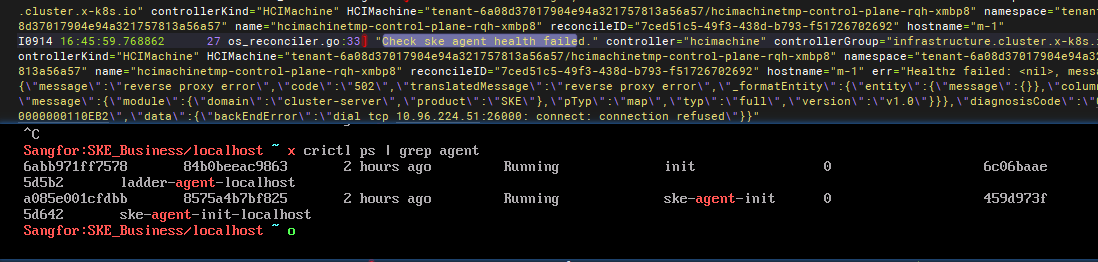
-
Review how the SKE management node detects the health of the Kubernetes cluster's ske-agent. It is found to be done through the default cloud ladder service
agent-api:26000 --> Kubernetes cluster ske-agent:20411. Usekubectl get svc -A |grep agent-apito check relevant services. -
It can be seen that the Kubernetes cluster's ske-agent service has not started. You can use the command below to check the relevant service:
crictl ps | grep ske-agentandsystemctl status ske-agent. -
Through
systemctl status ske-agent, it is discovered that the service is running, but service on port 20411 is not open, and the configuration file does not exist, so it is not started on the specified port.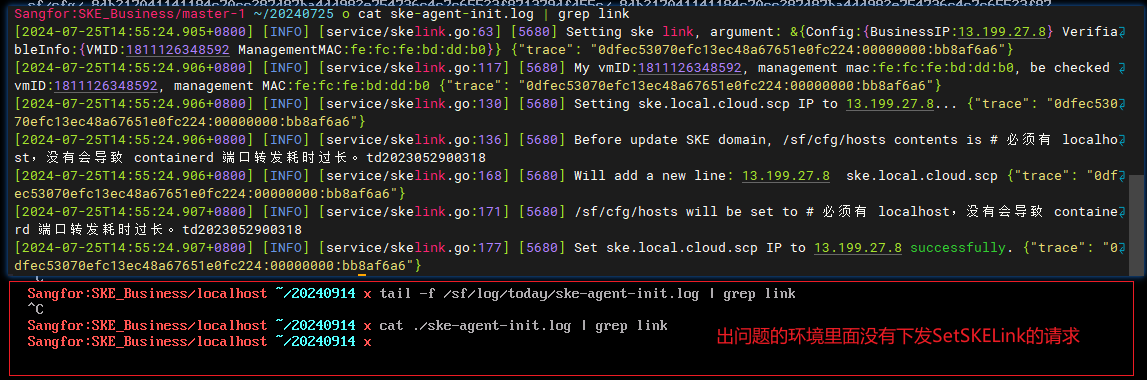
-
Problem Analysis
-
The launch of ske-agent depends on the initialization of aksk files.
-
The initialization of aksk depends on the issuance of the ske domain name.
-
The issuance of the ske domain name requires the ske-agent-init service to be healthy.
-
It is coordinated by the hciprovicer in SKE to fetch network information from xaas-api and then call the ske-agent-init's domain name setting interface.
-
It is now discovered that in
hcimachine, there is already a condition:SKELinkConfigReady, indicating that it is considered ready, but the domain name has not been actually issued.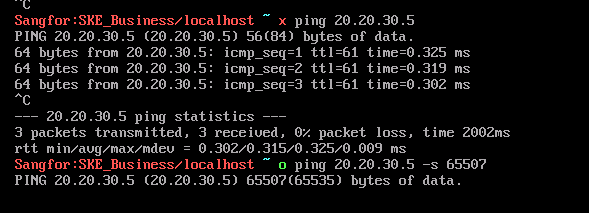
-
Suspect that the request has been sent but failed, and the issue is located to be data packet distribution failure.


Root Cause
Network is connected, but the data packets are failing to be sent.
Solution
Contact HCI colleagues to adjust the data packet fragmentation issue, for example, by modifying the MTU.
Scope of Operation Impact
NA
Is It a Temporary Solution?
NA
Recommendations and Summary
NA
Investigation Content
Original Link
https://support.sangfor.com.cn/cases/list?product_id=37&type=1&category_id=28868&isOpen=true