
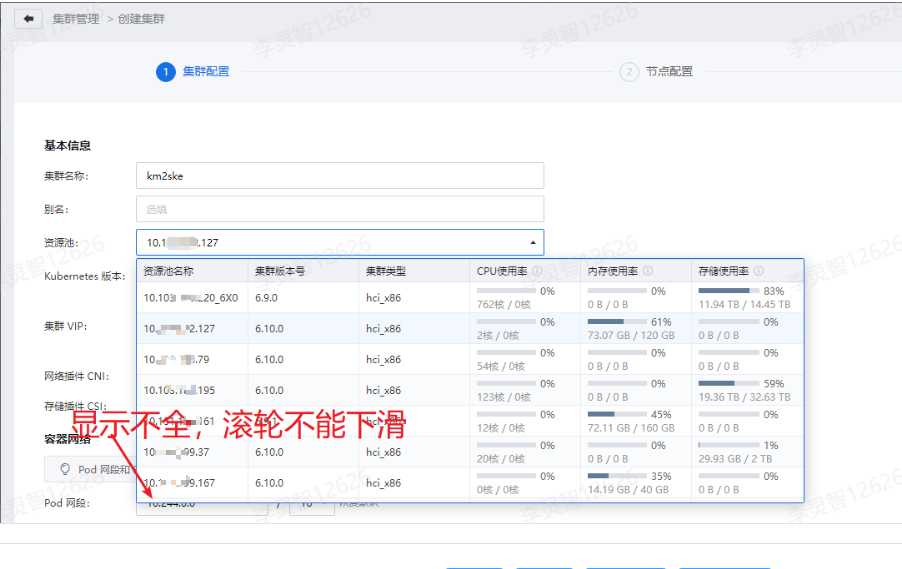
The corresponding resource pool cannot be found when creating a cluster. This component can display up to 8 resources. The number of resources exceeding the limit cannot be displayed.
Problem Description
When creating a cluster, the dropdown list under the resource pool only shows a maximum of 8 items, and any items beyond that cannot be selected.
This leads to the issue where one expects to find a specific resource pool but is unable to do so.
Alert Information
Effective Troubleshooting Steps
NA
Root Cause
Frontend component issue, fixed in SKE2.0
Solution
Open browser F12 -> Select "elements" -> Click the button next to it -> Click on the element in the browser interface that you want to select (in this case, select a row from the dropdown box)

After locating the corresponding element, right-click and select "Delete Element" to remove a row

Continue deleting until you find the list item you need to select

Scope of Operation Impact
Deleting elements in the interface does not affect the service.
Is It a Temporary Solution?
Yes
Suggestions and Summary
NA
Troubleshooting Content
NA
Original Link
https://support.sangfor.com.cn/cases/list?product_id=37&type=1&category_id=30927&isOpen=true