
【SSLVPN】All user unable connect to resources after connecting SSL VPN
Issue Description
All user unable connect to resources after connecting SSL VPN.
Error/Warning Information
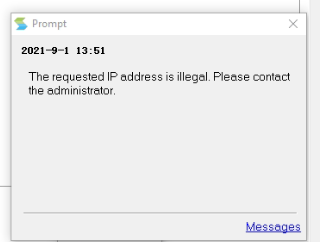
- When logging in with Easy Connect, user unable to connect to resources and it will prompt out error "The requested IP address is illegal. Please contact the administartor"
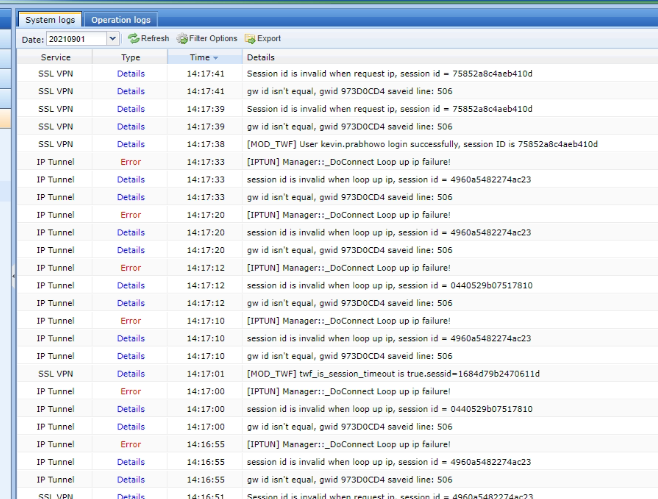
- SSL VPN system log will prompt the following error.
- User unable to get virtual IP.
Handling Process
- Known issue in SSL VPN M6.9-M7.6.8R2 version. (YJ20201207001, YJ20200712001)
- Root cause of the problem was due to the gateway ID obtained from the session session is inconsistent with the gateway ID obtained by the virtual IP allocation service, causing the client and server to fail to establish a command tunnel.
- Require to apply patch CTI-Support_M6.2-M7.6.9R1_TDComIpPolicy.ssu (Refer to attachments)
Root Cause
The gateway ID obtained from the session session is inconsistent with the gateway ID obtained by the virtual IP allocation service, causing the client and server to fail to establish a command tunnel.
Solution
If happen any abnormal after applying the patch, kindly rollback the settings:
- Access SSL VPN device backend.
- Execute “ cd /hislog/cti-support/TDComIpPolicy ”
- Execute " ./cti-support.sh -roll "