
【SSLVPN】SSL VPN change device timezone
Issue Description
Change device timezone. In this guide will show how to change device timezone to Moscow (GMT+3).
Handling Process
- Check the support timezone in /usr/share/zoneinfo/

- Check current system timezone with command timedatectl status
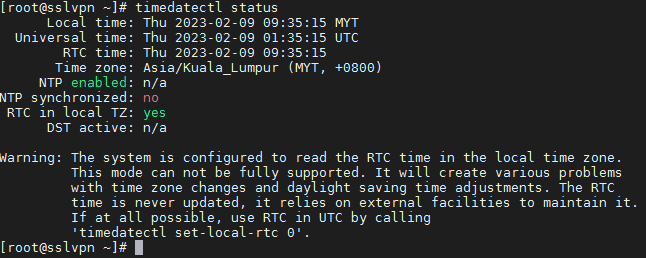
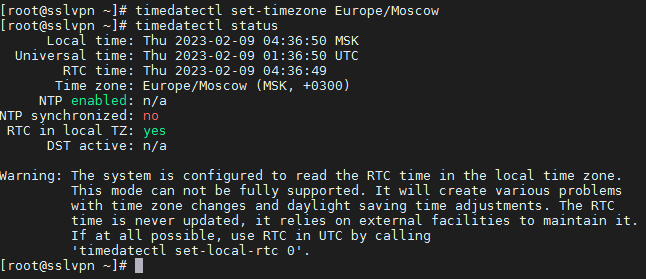
- Change timezone with command timedatectl set-timezone Europe/Moscow
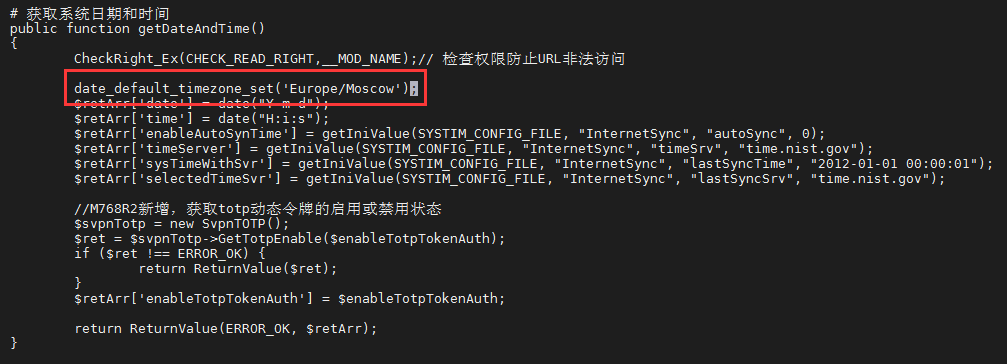
- Goto /sf/webui/htdocs/html/sys/syscfg/sysCfgController.class.php add date_default_timezone_set(‘Europe/Moscow’); in function getDateAndTime().
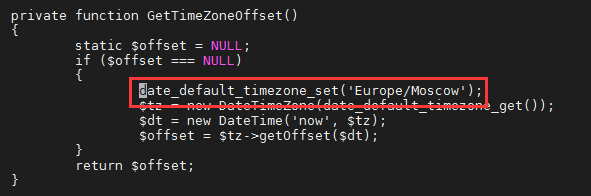
- Goto /sf/webui/htdocs/html/svpn/state/statechartController.class.php and add date_default_timezone_set(‘Europe/Moscow’); in function GetTimeZoneOffset().
Root Cause
Solution
Change device timezone from backend. PHP supported timezone in location format or GMT format. For example, date_default_timezone_set(‘Asia/Kuala_Lumpur’); or date_default_timezone_set(‘Etc/GMT-8’);