
【VDI】VMP SSD Firmware Remediation Service Pack Upgrade Guide_V5.5.0 to 5.5.6
Background
Through proactive quality testing, Sangfor Technologies recently discovered that certain Samsung and Intel SSD firmware versions have I/O latency issues.
After communicating with Intel and Samsung, it has been confirmed that some models of SSD firmware have issues, which may result in I/O latency that impacts the service. You can read the official notice from the vendor in the appendix.
Solution
Firmware Upgrade Package
Firmware upgrade for 550_EN, 550R1_EN, and 556_EN.
Upgrade package
VMP: Firmware Upgrade Package
File: aDesksp-ssd_fw_upgrade-550-556R1.pkg
For more details, refer to the MD5 file in the package folder, which can be obtained from the following URL:
https://community.sangfor.com/plugin.php?id=service:download&action=view&fid=8#/7/all
Pre-Upgrade Check
App version check:
Before upgrading, check whether the VMP app version supports the upgrade. If not, contact Sangfor Support for assessment.
Supported versions for upgrade:
Firmware: 550_EN, 550R1_EN, and 556_EN.
Note:
Upgrade from a beta version is not supported.
Cluster status check:
Cluster upgrade is supported. Ensure the cluster is normal before the upgrade to avoid anomalies.
Notes
Upgrade Impacts: The upgrade itself does not affect business. However, if there are abnormalities with the disk, the upgrade may cause interruption in I/O for 5 to 10 seconds, with a minor impact on VDI users.
The single-node cluster upgrade will affect business. Therefore, all VMs must be shut down before the upgrade.
| Precautions | Yes/No |
|---|---|
| Support cluster upgrade | Yes |
| Require VM shutdown | No (You are advised to perform the upgrade during off-peak hours.) |
| Log users out | No |
| Service restarts | Yes The following services will be restarted after the upgrade. Firmware: apache, vtpdaemon, and vm_schedule. |
Upgrade Method
-
Log in to VMP and navigate to System > Upgrade.
In the Upgrade section, select 1. Check Environment from the navigation pane and click Check Now.

-
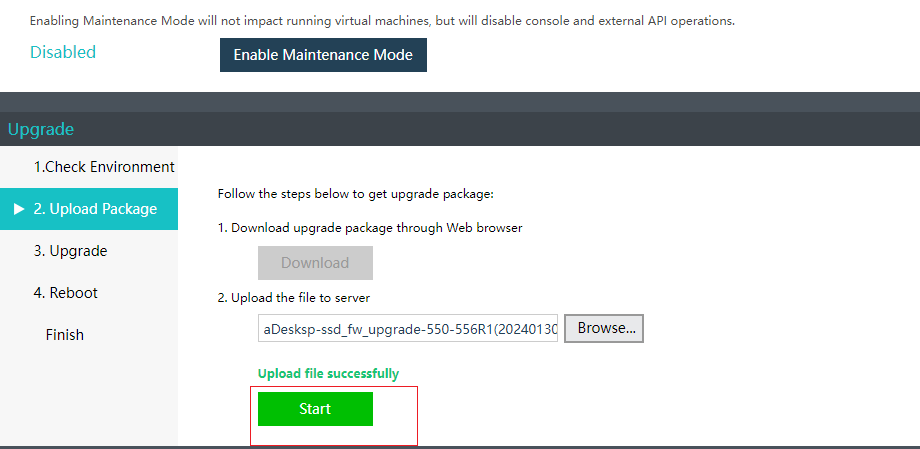
Upload the upgrade package and click Start to proceed.

-
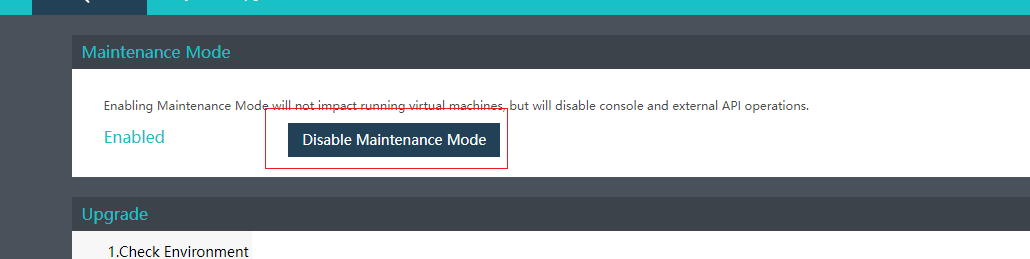
After the upgrade is complete, click Disable Maintenance Mode.
Test Conclusions
Post-Upgrade Check
| Check Item | Description |
|---|---|
| VMP version | Check whether the following information is added to the app version in the customer environment: Firmware: sp-ssd_fw_upgrade-550-556R1 |
Test Summary
- The functional test is passed, with issues being fixed after the upgrade.
- The exploratory test is passed, with no anomalies found in basic functions.