
【aDesk】, Delete Personal Drive from the VM, Powered On system Tips “Location is not available” when it boots up
Problem Description
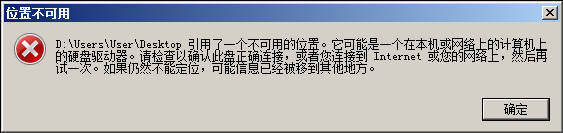
After VM Delete Personal Drive for some reason, a Tips , started: "D:\Users\User\Desktop references Mon unavailable location."
368685cb151b5b8cb6.png (12.52 KB)
Root cause
The derived VM will redirect the "Desktop" and "My Documents" to the Personal Drive D. When the Personal Drive is Delete, VM will still read the contents of the redirected location when it is turned on, resulting in an error.
solution
Change Registry About redirection. The Registry Path is as follows:
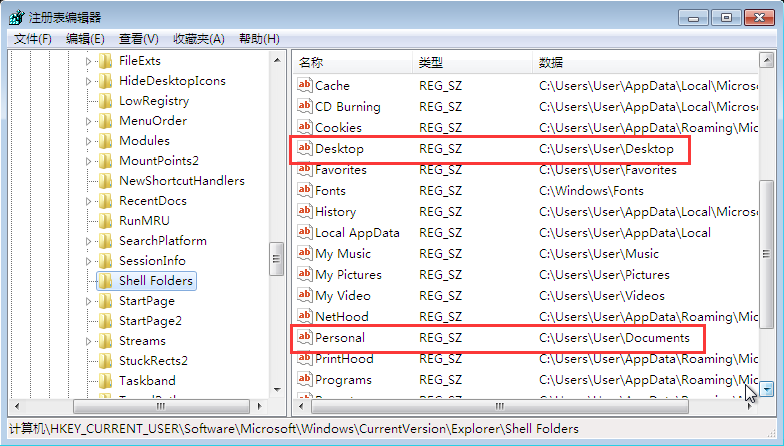
1) HKEY_CURRENT_USER\Software\Microsoft\Windows\CurrentVersion\Explorer\Shell Folders
Change the value data of "Desktop" and "Personal" to the following content (change the D drive Path to the C drive Path):
500715cb1574c88d7b.png (85.37 KB)
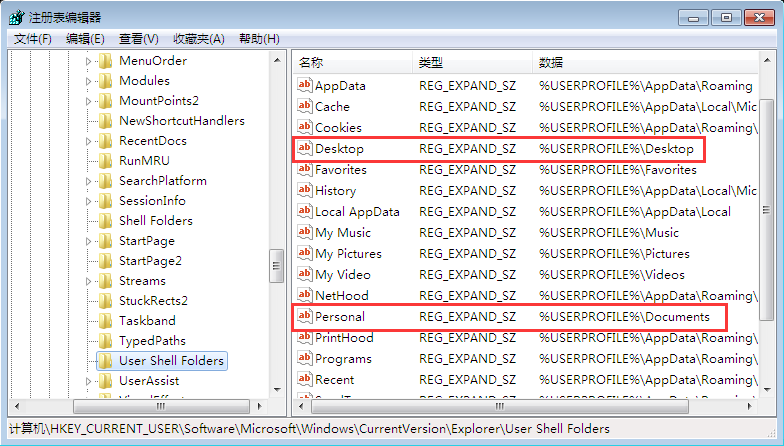
2) HKEY_CURRENT_USER\Software\Microsoft\Windows\CurrentVersion\Explorer\User Shell Folders
Change the value data of "Desktop" and "Personal" to the following content (change the D drive Path to the C drive Path):
707955cb1582d174bf.png (93.26 KB)
Suggestions and Conclusion
It is not recommended to Delete the disk or Change Registry. If you must Operation, be cautious.
Original Link
https://support.sangfor.com.cn/cases/list?product_id=26&type=1&category_id=10666&isOpen=true