
【aDesk】, Install a software on a Software, the Chinese font of the Software is displayed in garbled characters
Problem Description
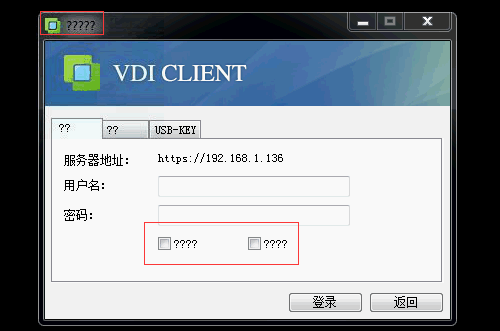
As shown in the figure below, after Install Software, it was found that Open Chinese fonts were garbled Yes opened.
829885b46f4bc67891.png (31.82 KB)
Process——
- OK whether there are any Error during Software Install. It is recommended to Close security Software and reinstall the anti-virus Software Install Test Connectivity.
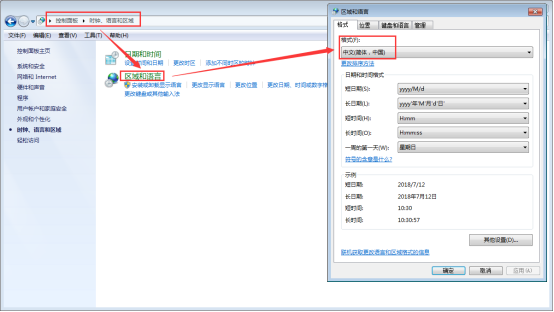
- As shown in the figure below, OK the Select font format Yes Medium in Control Panel->Areas and Language->Encoding Format.
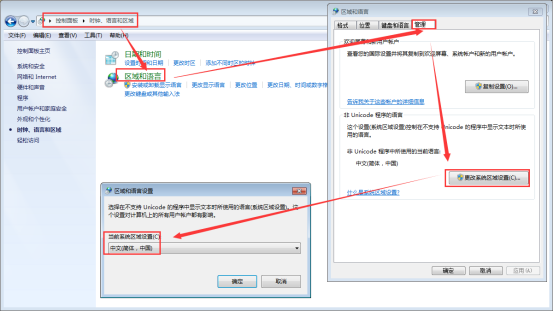
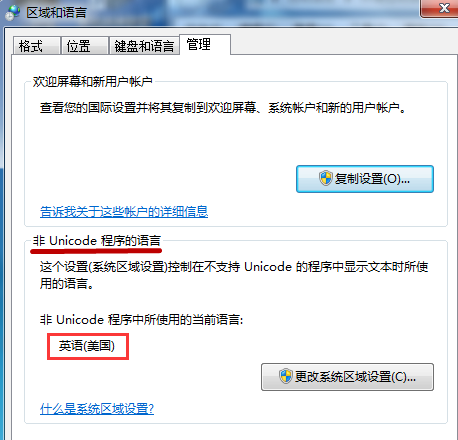
750625b46f4d500f68.png (61.4 KB) - As shown in the figure below, Auto unlock after Control Panel->Areas and Language->administration and management->Language for non-Unicode programs, OK the language Select is Simplified Chinese. The problem is that the English Settings the customer side causes garbled Chinese fonts.
580815b46f4e109058.png (76.8 KB)
280145b46f4e9ab5a7.png (54.74 KB)
Root cause
The language Medium Auto unlock after non-Unicode programs in the system Yes English, which causes garbled Medium characters to be displayed.
solution
Auto unlock after Control Panel -> Areas and Language -> administration and management -> Language for non-Unicode programs, set the system Areas to Simplified Chinese.
Original Link
https://support.sangfor.com.cn/cases/list?product_id=26&type=1&category_id=10334&isOpen=true