
【aDesk】2D VM cannot use iClip Software
Problem Description
VM uses iClip Software, and Video cannot be Edit.
Warning Information
Tips Cannot Enabled system Hardware Acceleration rendering
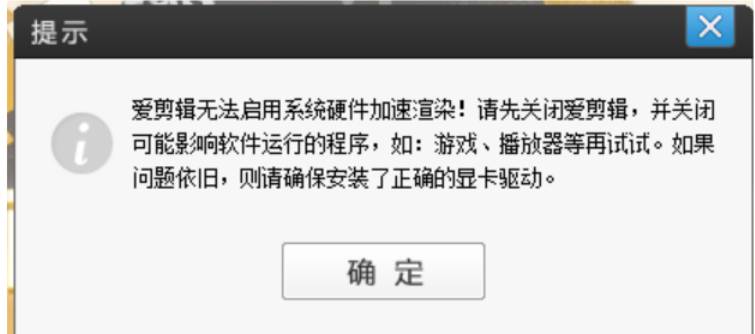
1.png (62.4 KB)
Process——
- Add the Process Add D3D and DDRAW list, but still cannot .
- Change iClip decoding settings to Software decoding.
- Log out Log In again VM to Powered on iJianji normally.
Root cause
- The 2D VM does not have a graphics card, and Default decoding Settings iJianJi Yes Passed decode through the graphics card, which makes it impossible to Powered on
solution
-
Add the Process Add D3D and DDRAW list respectively

2.png (26.03 KB) -
For the Mon times, you need to Change iClip decoding settings to Software decoding
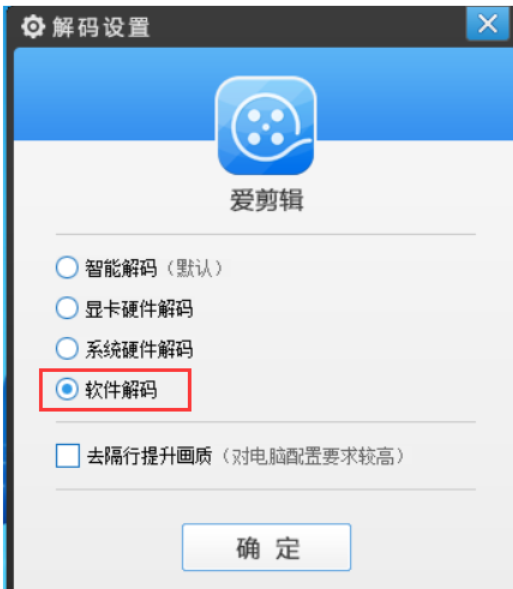
3.png (58.59 KB) -
Log out Log In again VM to Powered on iJianji normally.
Original Link
https://support.sangfor.com.cn/cases/list?product_id=26&type=1&category_id=10828&isOpen=true