
【aDesk】3D environment host load imbalance
Problem Description
3D environment host load imbalance
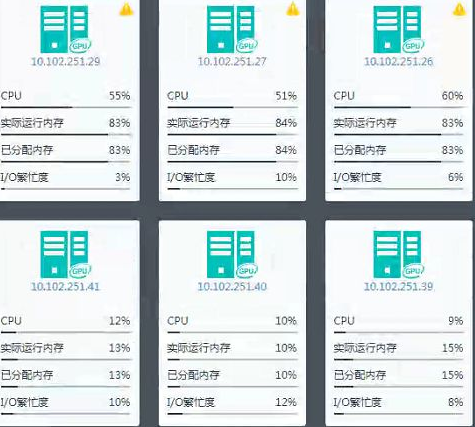
Warning Information
None
Effective troubleshooting steps
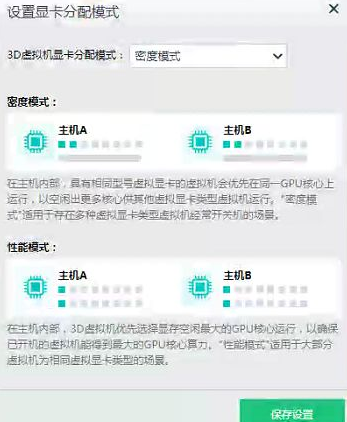
1. View GPU allocation Mode
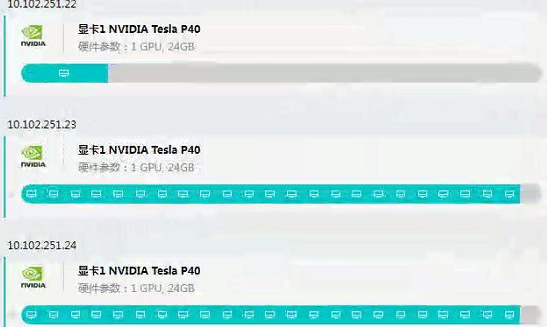
2. View GPU usage Status
Root cause
Because of the graphics card allocation
1. If Select density Mode Yes selected, the virtual machine will be allocated to the host that has already used the graphics card.
2. The graphics card allocation method is different. The virtual machine will Running on different hosts due to the different graphics card allocation methods. For example, if a 2Q graphics card VM is Running on a host, then graphics cards Other allocation methods will no longer Running, which will lead to an imbalance in host Resource.
solution
None This Yes characteristics of the graphics card.
The graphics card allocation Mode can adopt the performance Mode, which is consistent with the graphics card allocation method of the VM.
Original Link
https://support.sangfor.com.cn/cases/list?product_id=26&type=1&category_id=11927&isOpen=true