
【aDesk】3D graphics card Invalid, causing AutoCAD Software be slow to use
Problem Description
Win10 3D VM slows down when using AutoCAD 2016
Warning Information
No Warning, CPU Usage single core fully utilized, 3D Settings is TitanGPU.
Effective troubleshooting steps
1. Use the Move function to select more elements in the drawing, right-click Select the base point to Move and start Move. The CPU Usage usage is High and the single core is fully utilized;
For the judgment method, see How to judge whether Software on a single core
2. Open NVIDIA control panel and find that the Win10 VM still uses the 442.06 graphics driver:
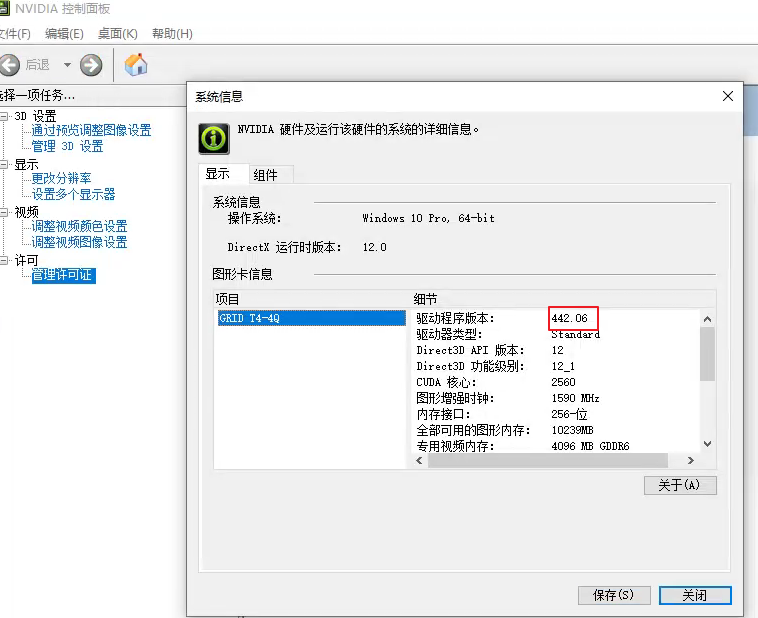
3. Enter the 3DCONFIG command in AutoCAD to Open Hardware Acceleration Settings interface:
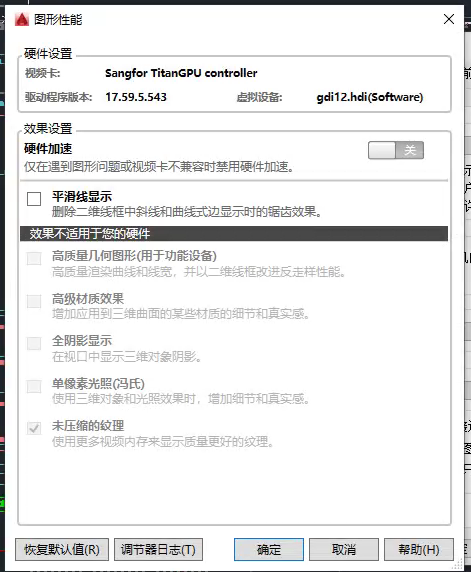
Not Settings (150.69 KB)
The graphics card used is still the virtual graphics card of Sangfor TitanGPU, not the actual 3D graphics card.
Root cause
The T4 graphics card was not used, and the installed driver Yes 442.06, which caused the single core to run at full capacity.
solution
1. Uninstall this 442.06 graphics driver, restart VM, and Reset the new Version of the graphics driver Auto unlock after VMP Administrator Console (this vdi Version recommends 452.39);
2. Settings AutoCad to use a high-performance graphics card. Version Above 551 can also directly remove the redundant SangforTitanGPU graphics card device.
Settings method:  AutoCAD Enabled high-performance graphics and Hardware Acceleration (1.16 MB)
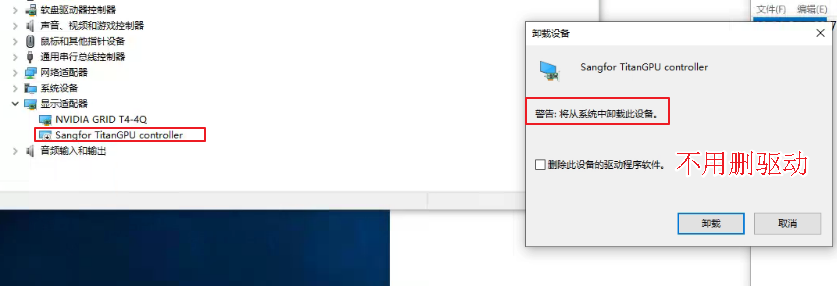
3. Configure AutoCad optimization items according to the Settings Description in the "Best Practices for 3D Software Settings Settings 3D Design entries updated":
NVIDIA Control Panel -> 3D Settings -administration and management 3D Settings -> Wed Buffering – Off
NVIDIA Control Panel -> 3D Settings -administration and management 3D Settings -> Texture Filtering -> Quality – High Performance
NVIDIA Control Panel – 3D Settings – administration and management 3D Settings – Power administration and management Mode – Highest Performance
For complete optimization suggestions, see 3.1 AutoCAD Optimization Suggestions
Operation Impacts Applicable To
Odd Operation
Suggestions and Conclusion
1. Very Software require code changes (except for cursor optimization plug-ins for AutoCAD, ZWCAD etc., Software, we have not actually invaded the operation of Software itself). Basically, it is Settings related, so don't be afraid of it.
2. OK 3D Software is slow, first confirm that the graphics card Effective and the corresponding Software Process consumes GPU. Then View there is any relevant optimization configuration in the "Best Practices for 3D Software Settings in Sangfor 3D Design Scenes". Finally, Baidu's related Settings is slow and how to Settings optimize.
Original Link
https://support.sangfor.com.cn/cases/list?product_id=26&type=1&category_id=12392&isOpen=true