
【aDesk】3D Licensing server Import Licensing Details
Problem Description
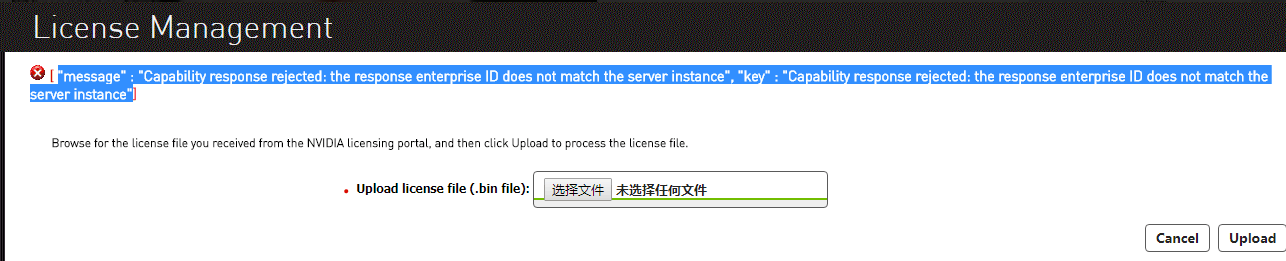
After the 3D Licensing server Import Licensing Details, Licensing Failed
631605be15b50e12ef.png (65.5 KB)
Process——
- According to the error Tips, OK Yes Licensing File Error;
- It is recommended to regenerate the bin File.
solution
- Since Mon Licensing server can only be Licensing times, to re-import Import new bin File, you need to restore the Licensing server snapshot to the Status before Licensing;
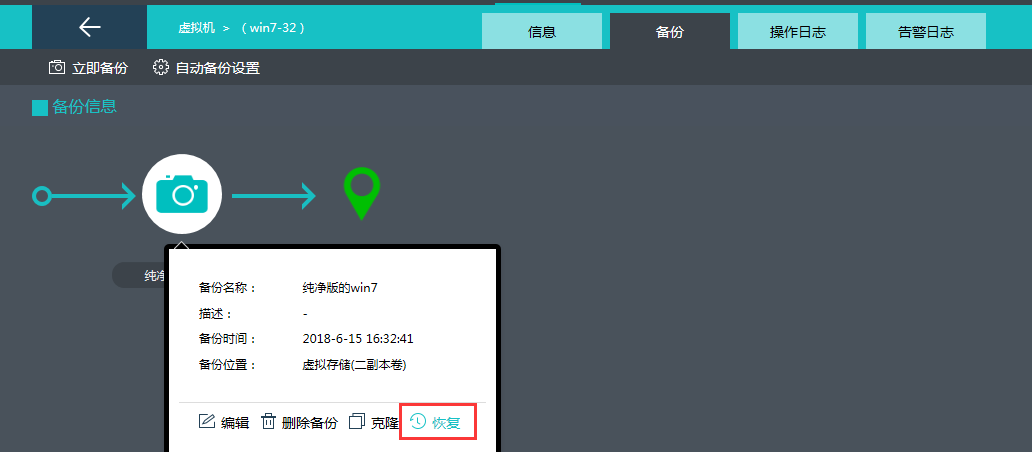
940105be28b54386fa.png (37.93 KB) - Restore snapshot, re-Import bin file Licensing the 3D File;
- If no snapshot is taken Below the server is deployed, you need to redeploy the Licensing server and then Import bin Licensing File.
Original Link
https://support.sangfor.com.cn/cases/list?product_id=26&type=1&category_id=10549&isOpen=true