
【aDesk】3D simulation Software UnityVR.exe Click right-clicked, and the view cannot be rotated
Problem Description
3D simulation Software UnityVR.exe has no response when right-Click, and the viewing angle cannot be rotated
Warning Information
The right button cannot rotate the view
Effective troubleshooting steps
-
When using mstsc to connect, the right button None be used, None Click, and it cannot be rotated.
-
The physical machine uses VNC and Sunflower to remotely connect to another physical machine, and the right button cannot .
-
Contact the third-party software manufacturer, and they said that they do have problems with right-clicking on virtualization.
-
Settings relative cursor to solve the problem.
Root cause
The right-click Software Auto unlock after third-party software in virtualization scenarios has problems and needs to be handled on the platform side.
solution
Settings for UnityVR.exe
The client Yes 32characters long. Windows 7, first turn on the relative cursor switch
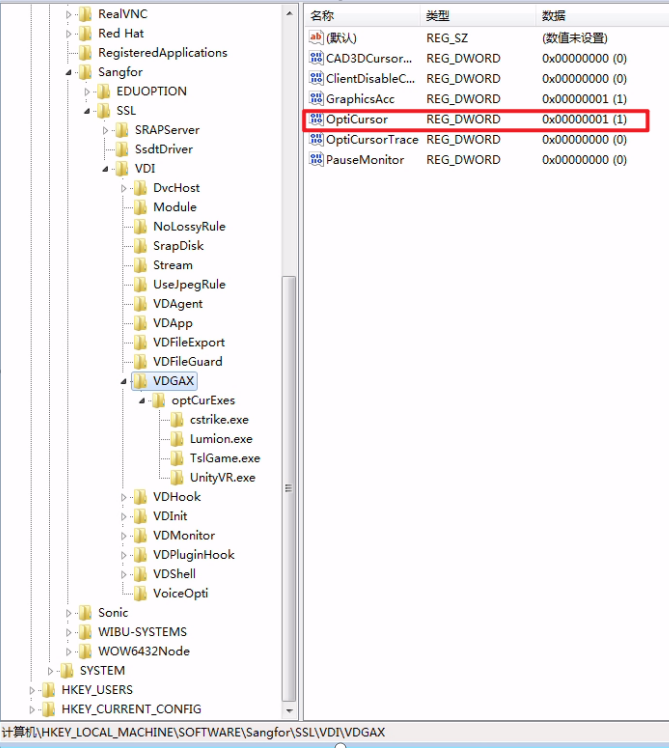
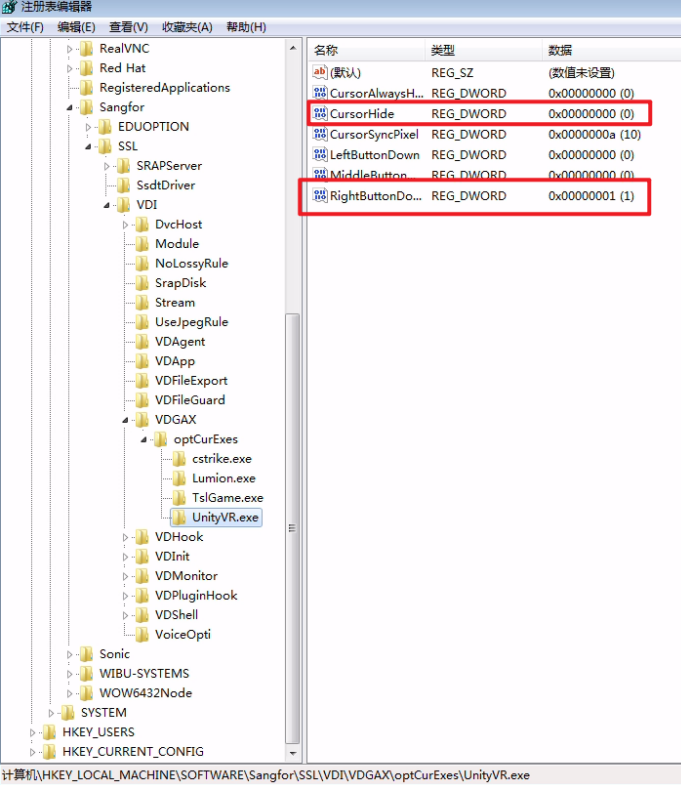
Below Add Software name UnityVR.exe, Reset RVLAgent.exe, and change the Value to the right.
Original Link
https://support.sangfor.com.cn/cases/list?product_id=26&type=1&category_id=11271&isOpen=true