
【aDesk】3D Software solidwork is slow
Problem Description
- It has been configured according to the best practices, and Operation drawings has improved, but it is still obvious.
- 3.0G Intel server, 12cores VM
Warning Information
None
Effective troubleshooting steps
If 3D graphics are slow, you need to first locate the slow link (client, network, VM)
- PC Client performance can be directly checked with the performance monitor View if computing Resource tight.
The box needs to View background and Running top - If there is no Error Client, check the network
Change the FPS of the transmission Policy the VDC to see if the effect improves. - VM is slow, you need to analyze the computing Resource VM.
(1) GPU
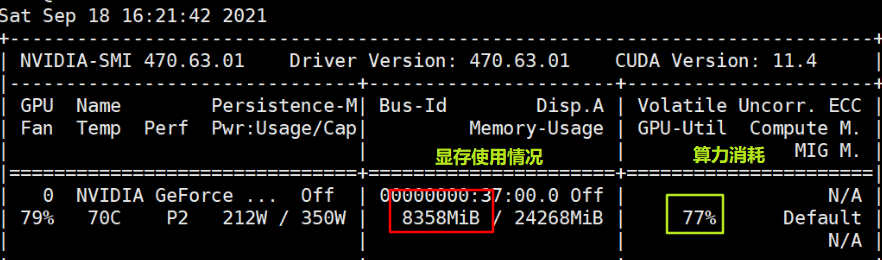
To obtain more accurate and detailed information Resource the virtual VM graphics card resources, use NVIDIA's nvidia-smi.exe (C:\\Program File\NVIDIA COPERATION\NVSIM)
Running nvidia-smi.exe -L 1 in cmd (secs Mon times)
(2) CPU Usage
Do not use the VM performance monitor results to evaluate VM CPU Usage status, use PROCEXP! ! !
Auto unlock after thread consumption of the slow Process in procexp.
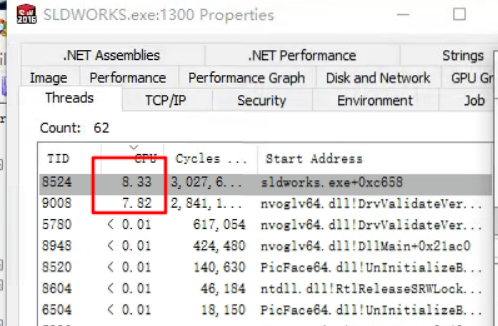
This VM has 12 cores, so the computing power of a single cores is about 100% / 12 = 8.33%, so the performance of the two boxes here is close to exhaustion
Root cause
CPU Usage single core running full
solution
Replace with a CPU with a higher clock speed
Operation Impact Scope
None
Original Link
https://support.sangfor.com.cn/cases/list?product_id=26&type=1&category_id=12323&isOpen=true