
【aDesk】5.3.3 and above Version, XP VM Tips agent Status Error
Problem Description
In versions 5.3.3 and Below, the XP VM Tips Status agent status Error
Warning Information
Agent status abnormal
Process——
CA patch link: https://pan.baidu.com/s/1bZAl2ZTcR0fiw9m3gcbYpg Extraction code: v6q4
The CA patch needs to be Install on the abnormal virtual machine. The Install process is as follows:
1. Download the patch and put it on the system disk
Unzip and see Mon rootsupd.exe
2. Running cmd with administrator Role
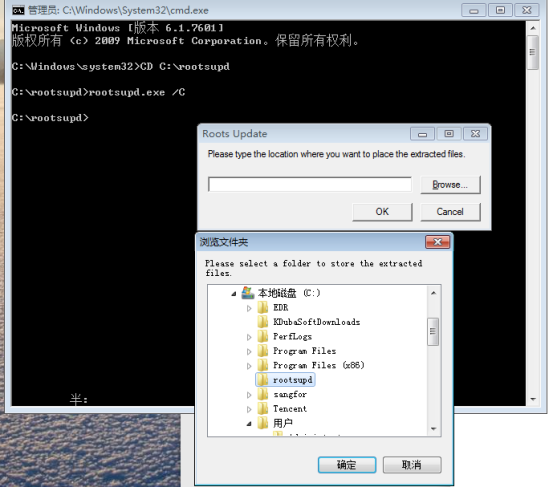
Switch to the rootsupd.exe directory and Running rootsupd.exe /C (this Yes Mon decompression Operation, and you will see several New File added)
Select Mon decompression directory (here Select Yes directory in step Mon)
734565f08625bc0e23.png (107.03 KB)
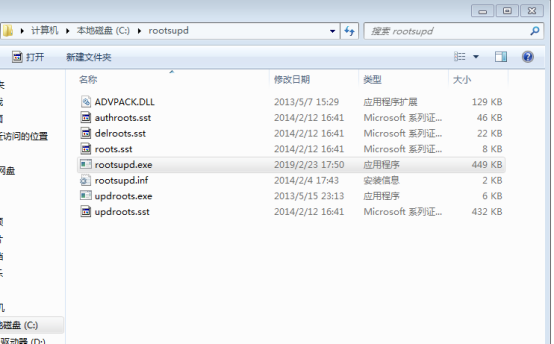
At this time, you can see several new File appear in this directory
515695f08628dec1b1.png (61.24 KB)
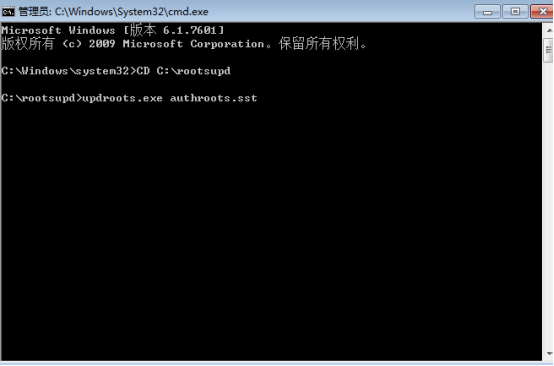
- Running Passed command line: "updroots.exe authroots.sst" "updroots.exe roots.sst" "updroots.exe updroots.sst"
Description You need to switch to the corresponding File and execute Wed commands in sequence
453305f0862ef68e69.png (26.08 KB)
Root cause
Microsoft Update the CA patch, but the XP system has not Update, resulting in an Tips Status after Install the agentError
solution
Follow the above CA patch Install Operation Install it
Suggestions and Conclusion
Notes:
a. After executing the command, you need to Reset VM, which needs to be done after communicating with the customer
b. Currently, there is no batch execution method, and the CA patch needs to be reinstalled on the abnormal virtual machine.
c. You must unzip the updroots.exe File the CMD command interface, otherwise File cannot Install
Original Link
https://support.sangfor.com.cn/cases/list?product_id=26&type=1&category_id=10946&isOpen=true