
【aDesk】5.3.8 Version, after Install ADesk client, VM Reset Tips “this ADesk electronic classroom Version is inconsistent AND aDesk vdi Version”
Problem Description
Version 5.3.8. After Install Jiyu client, VM Reset and Tips "this Jiyu electronic classroom Version is inconsistent AND aDesk vdi Version."
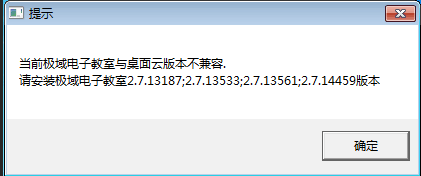
485235c15f19ad7775.png (9.92 KB)
Process——
- OK whether Version and VMP Version. You need to ensure that Version Mon consistent. If they are inconsistent, you need to reinstall the corresponding Version of Jiyu;
- Check that Version Jiyuyu and Install VMP. Reinstall Jiyuyu client and the same Tips will still appear.
- After checking, it was found that the Above uninstalled Jiyuyu client was incomplete.
Root cause
The teacher client was Above Install in the virtual machine and was not uninstalled, resulting in a Version Tips.
solution
- Open Path: C:\Program Files (x86)\Sangfor, find the two directories VDEdu and VDEdustu;
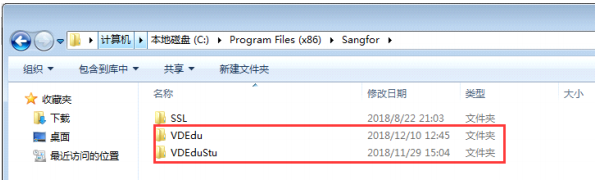
867255c15f2b3f0184.png (70.98 KB) - View VDEdu directory and double-click EduShellUnInstall to uninstall;
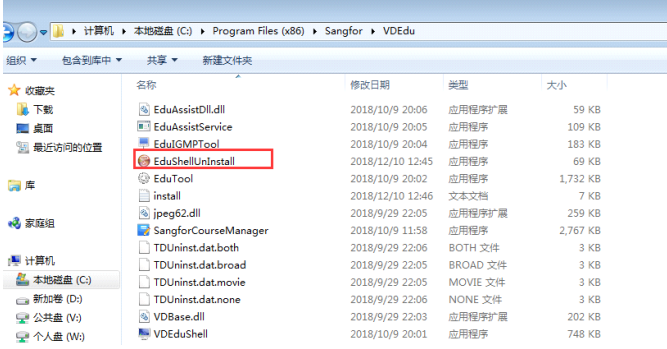
553045c15f39b498d9.png (149.71 KB) - Reset VM and View Details error message disappears.
Original Link
https://support.sangfor.com.cn/cases/list?product_id=26&type=1&category_id=10601&isOpen=true