
【aDesk】5.3.8sp1 cluster Cluster Tips Version
Problem Description
When two VMP devices with version 5.3.8sp1 are used to form a Cluster, an error message Tips Version are inconsistent.
Process——
Log In administration and management VMP management interface, Click [administration and management] – [Device Upgrade] and scroll down to [Upgrade Details]. Move the cursor to the Current Version Details and place it above the Version information. Detailed Version Details will pop up. View as follows
One is

406585c925a3799cff.png (10.11 KB)
The other one is

573965c925a5c34ae0.png (7.29 KB)
Root cause
The first one has an additional patch package sp-build-vmp5.3.x-ssd-cache-optimize
solution
Also apply this patch to hosts that do not have it.
Patch package at: http://bbs.sangfor.com.cn/plugin … 100000021878125/all
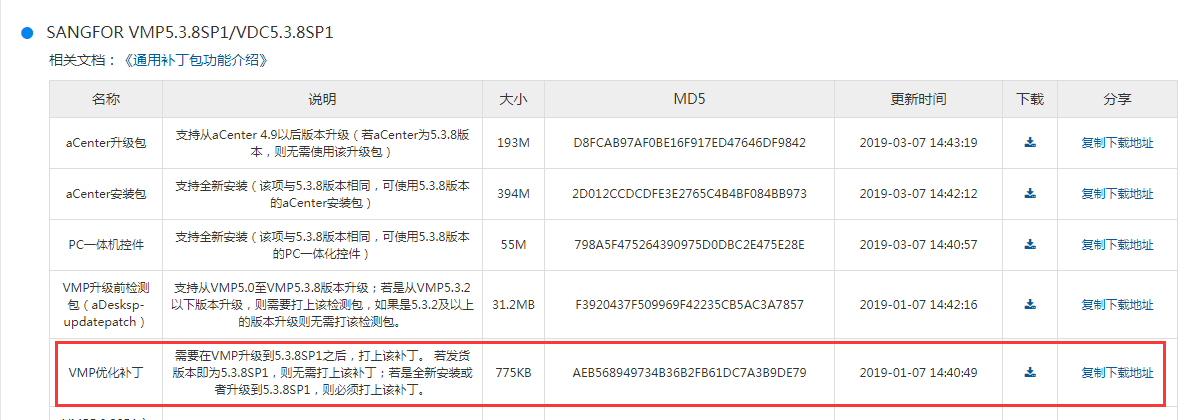
530465c92570449a2b.png (82.44 KB)
Upgrade method:
-
Log in to the VMP console first, check the VMP serial number, and confirm that the serial number is valid to avoid the problem that the virtual machine cannot be started after restart due to invalid serial number.
-
Then open the [Management] – [Device Upgrade] interface, turn on the VMP maintenance mode, click [Upgrade to other versions] and load the VMP pkg upgrade package to start the upgrade.
-
After the upgrade is complete, there is no need to restart VMP, just turn off the maintenance mode.
Original Link
https://support.sangfor.com.cn/cases/list?product_id=26&type=1&category_id=10627&isOpen=true