
【aDesk】550R1-Use IE View the wmplay video page, the screen Video black, but there is sound
Problem Description
550R1 Version – When viewing the wmplay Video using IE, the screen is black but there is sound
Effective troubleshooting steps
- For audio Video problems, you first need to OK whether the agent Connected. This problem OK agent Connected;
- OK whether audio and video redirection Close;
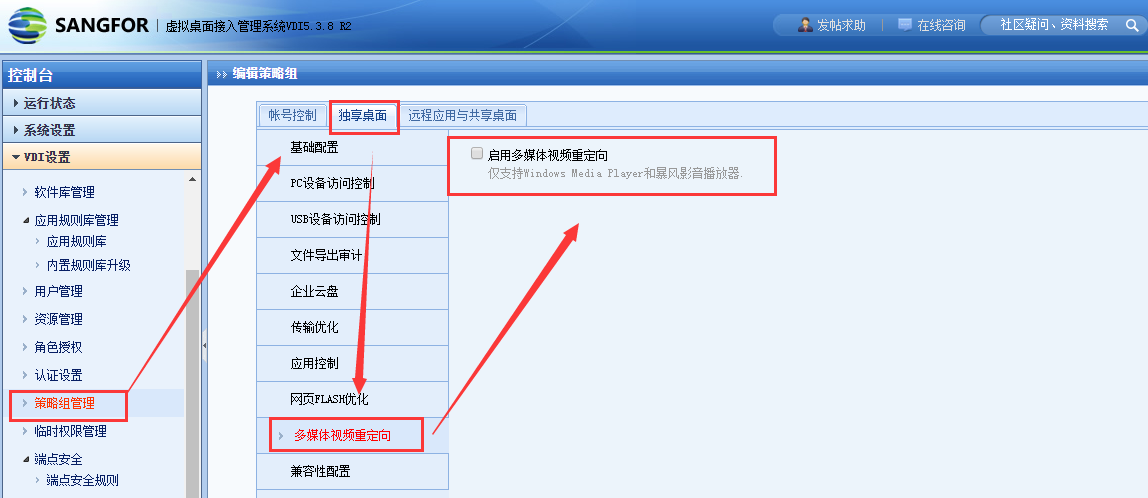
Audio Video video redirection Connected enabled normally - Settings DDRAW OR D3D list Test Connectivity. Because the customer asked to solve the Template problem, the VM Change Registry Test Connectivity. The Template Disabled DirectDraw. After Update template, Connected.
Disabled DirectDraw method:
Found the File: System32\sangfor_disable_directdraw.dat. Edit File and write Mon character 1. (If Tips you do not have full Role Save, you can copy it first, Edit, and then replace it)
Reset VM.
Root cause
The problem Yes that the agent enables DirectDraw support in VM by default.
solution
Template Disabled DirectDraw and Update Template;
Disabled DirectDraw method:
- Find the File: System32\sangfor_disable_directdraw.dat
- Edit File and write Mon character 1. (If Tips you do not have full Role Save, you can copy it first, Edit, and then replace it)
- Reset Windows VM.
Original Link
https://support.sangfor.com.cn/cases/list?product_id=26&type=1&category_id=12229&isOpen=true