
【aDesk】550R1 Version Win7 Enterprise Edition VM added to the domain, failed to obtain the AD domain Settings computer group Policy
Problem Description
AD domain Settings network public disk Passed computer group Policy. The Win7 Enterprise Edition VM cannot obtain the corresponding public disk after adding the domain;
Warning Information
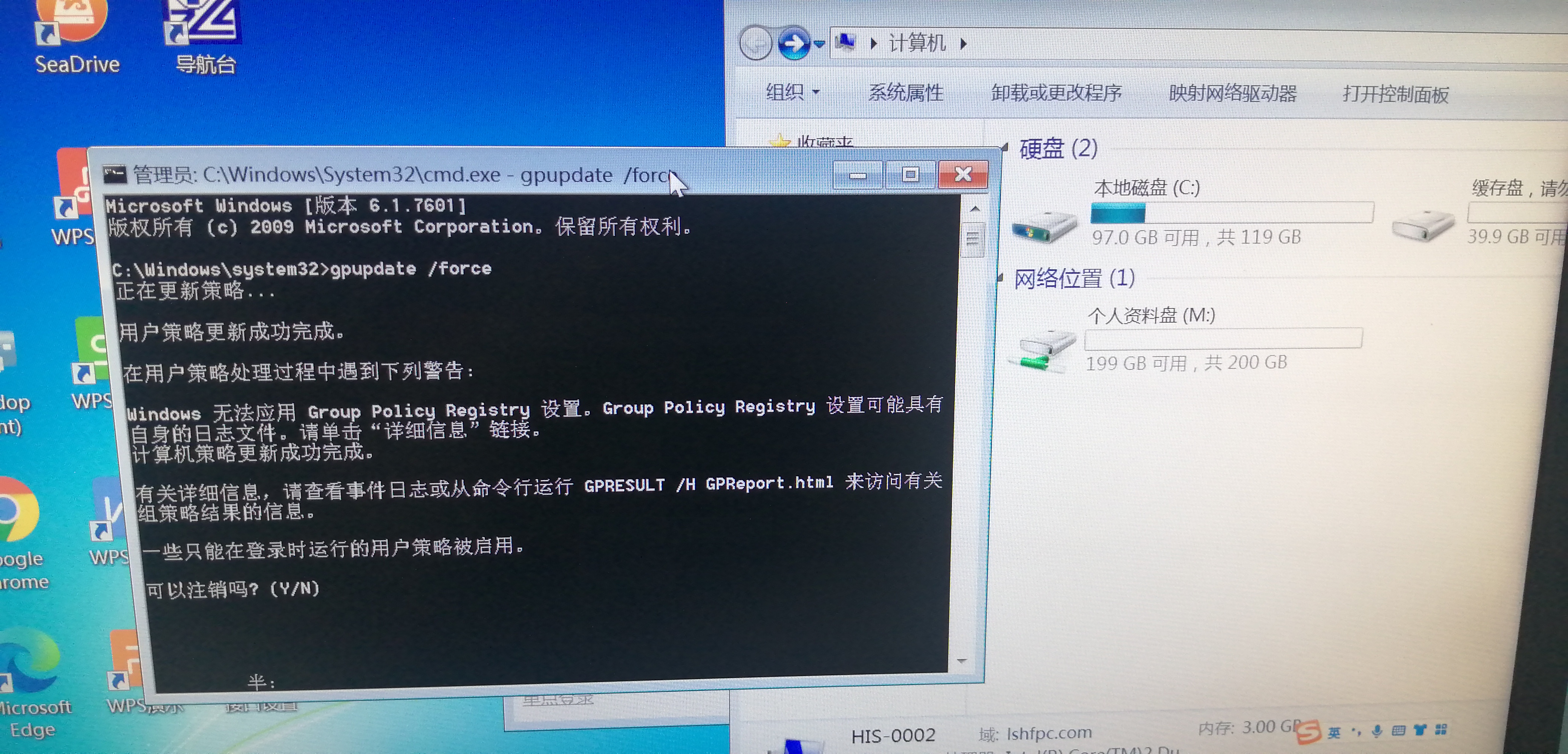
Internal execution.jpg (2.51 MB)
Effective troubleshooting steps
1. Execute gpupdate /force inside the virtual machine. User Policy Successful Finish successfully, and a warning is encountered, as shown in the figure above;
2. After uninstalling the Agent, re-execute the above command, the problem still exists;
Root cause
Microsoft's troubleshooting list record this issue, see:
https://docs.microsoft.com/zh-cn/troubleshoot/windows-client/group-policy/fail-to-apply-group-policy-at-startup
solution
Solved Passed Win7 Professional Image Rebuild Template
Suggestions and Conclusion
550 The domain adding logic has been Change to support computer group Policy acquisition.
Original Link
https://support.sangfor.com.cn/cases/list?product_id=26&type=1&category_id=12183&isOpen=true