
【aDesk】552 restore Mode VM system Error
Problem Description
In the customer restore Mode VM, Windows Photoshop crashes Open an image and reports Error File system error (Error ValueTips Invalid Registry value). According to feedback from Mon-line colleagues, this problem did not exist Above, and Template None this problem. Baidu's method (uninstalling and reinstalling the Windows Photos function) can temporarily solve the problem of Odd VM, but the Error Fault Restore will occur after restoration.
Warning Information
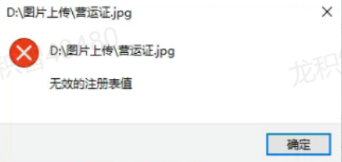
Effective troubleshooting steps
Template None this Fault. After using Template Update VM, Fault None be eliminated. In theory, Update VM, VM system disk should be Mon AND Template. It is suspected that the Fault phenomenon AND the relevant User Save by UPM.
Root cause
The customer Settings Template after configuring the userprofile and deployed new software, which caused changes to the Registry and Software environment of the system disk. However, the original Settings Policy Auto unlock after upm policy conflicts AND this system disk software environment after the Software. There are too many Registry changes, and the Fault point cannot be View out temporarily. In addition, this upm does not support adding the Registry to the exclusion Path.
solution
It is recommended that the Policy Close of userprofile and redirect the specific directory required instead.
Operation Impacts Applicable To
Odd Policy
Is Yes temporary solution?
Yes
Suggestions and Conclusion
After the release of UPM2.0, you need to carefully Settings %USERPROFILE% entries updated. These entries updated will redirect the registry under HKEY_CURRENT_USER, and subsequent Template changes may cause unpredictable Error.
Original Link
https://support.sangfor.com.cn/cases/list?product_id=26&type=1&category_id=13289&isOpen=true