
【adesk】560 Desktop Cloud Template Machine Agent Connected Error
Problem Description
560 Desktop Cloud Template Machine Agent Connected Error
Effective troubleshooting steps
- I have Reset VM, reinstalling VM agent, and Reset VDC, but to no avail.
- View VM and find that the VDC Address connected by the agent Yes Default Address 10.254.254.254, and the VDC Address has been modified on SCP.
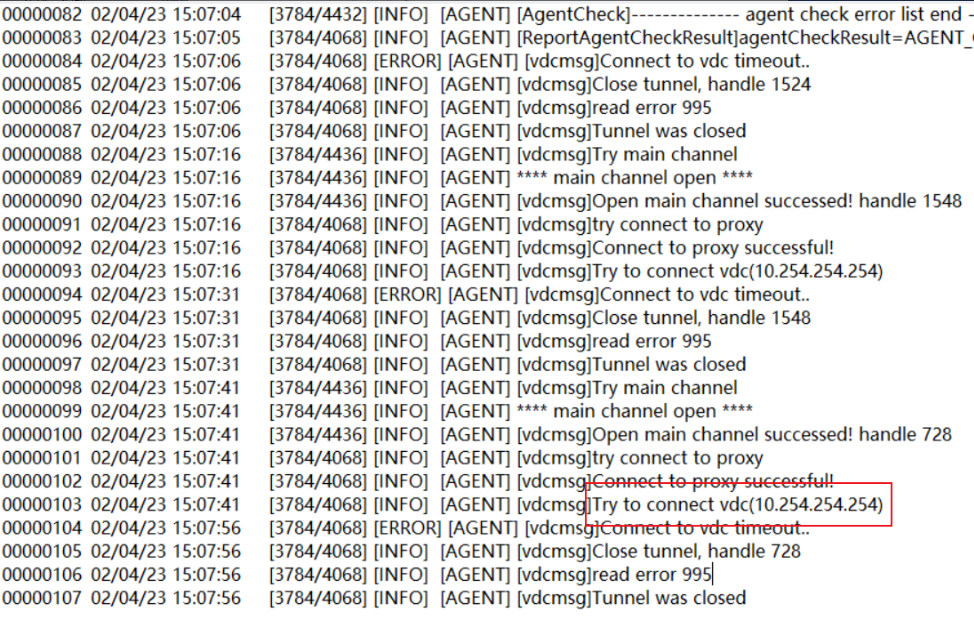
3. , communication and OK, after Change Address SCP, the Template machine was deployed. When Install the agent, it was found that Interface Yes still Default the default Address. At this time, the address of the Interface was manually Change. HoweverYes restarting the VDC and the Template machine and Reset the agent, the agent still could not connect to the VDC. The log still showed Yes it was connected to the Default Address 10.254.254.254.
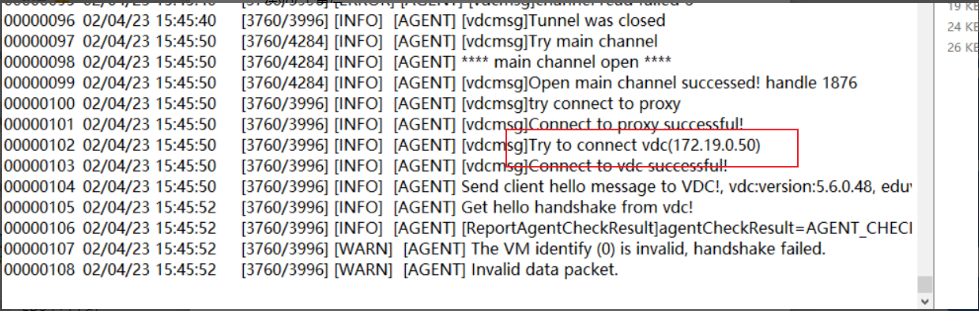
4. AND R&OK , Change IP address address, you need to Reset Template machine and all VM VDC to make the agent re-handshake AND the new VDC address. After Operation, the Address shows that the connection Connected:
Root cause
The Address of the VDC is changed on SCP, but when the template is deployed, it is found that the actual Interface of the VDC has not changed. At this time, the actual Interface IP address is Change. The Template machine and the derived machine need to be restarted on the VDC to enable the agent to connect to the new address again;
solution
Reset the Template machine and derived machines Auto unlock after VDC.
Original Link
https://support.sangfor.com.cn/cases/list?product_id=26&type=1&category_id=13735&isOpen=true