
【aDesk】6.8.0 Version when Log In VM machine using the vdi client: Resource initialization Failed
Problem Description
When logging into a virtual machine using a vdi client Version 6.8.0Log In Tips: Resource initialization Failed
Warning Information
vdi Log In Tips: Resource initialization Failed
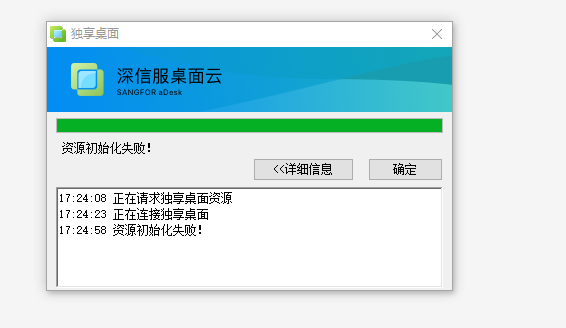
baocuo.png (37.35 KB)
Effective troubleshooting steps
- Check the terminal communication network Interface View Client interface Select the host administration and management port;
- Test from the computer to the host administration and management port Address, Port 443 can be Log In, but port 5500 is not accessible
- View [System administration and management] – [Port administration and management], there is a aDesk vdi Connected Service Port, Yes Disabled; after enabling this Service port, Test Connectivity that the communication of Port 5500 Connected, and Test Connectivity Connected VM can also be Connected Connected.
solution
Auto unlock after "Port aDesk vdi administration and management Port" Enabled [Port Service] Port
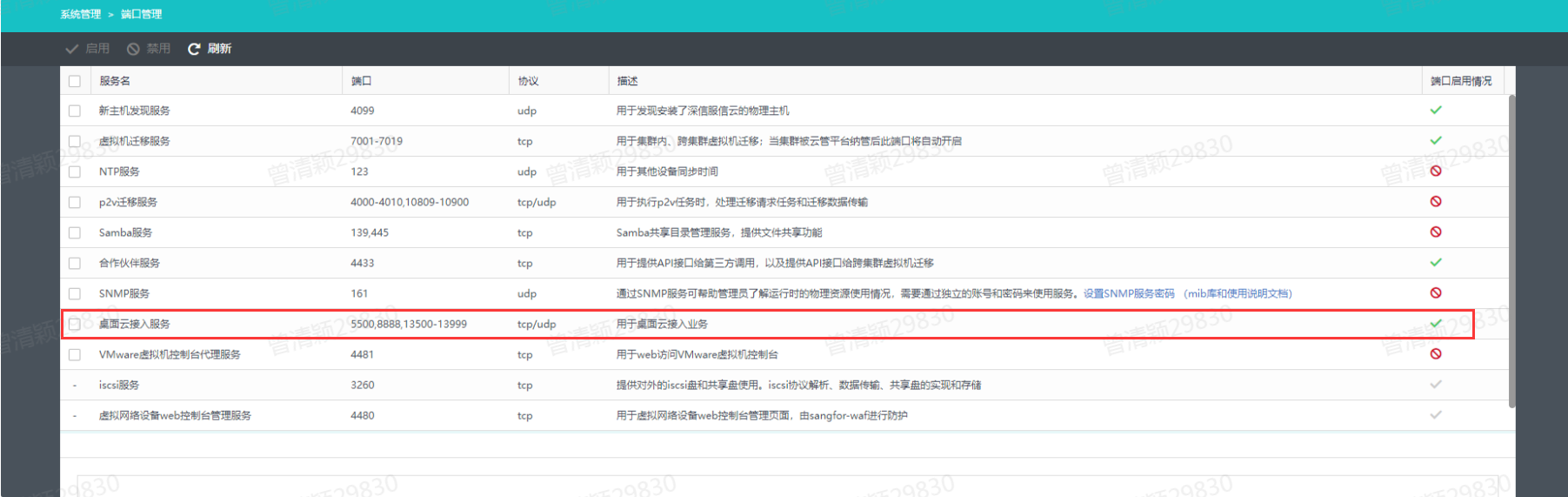
Port administration and management (199.45 KB)
Original Link
https://support.sangfor.com.cn/cases/list?product_id=26&type=1&category_id=13278&isOpen=true