
【aDesk】Abnormal use Connected VM keyboard after PC client accesses VM
Problem Description
Odd PC client Connected VM (Windows 10 1809), the keyboard in the VM cannot be used, but the mouse Connected.
Effective troubleshooting steps
- Running PChunter64 program to View App layer hook, where the WM_KEYBOARD_LL Class is marked as keyboard hook

2. In PChunter64, check Kernel Hook -> Keyboard Hook, and View the signature of the loaded keyboard hook driver, which is not the driver signed by the system Microsoft.
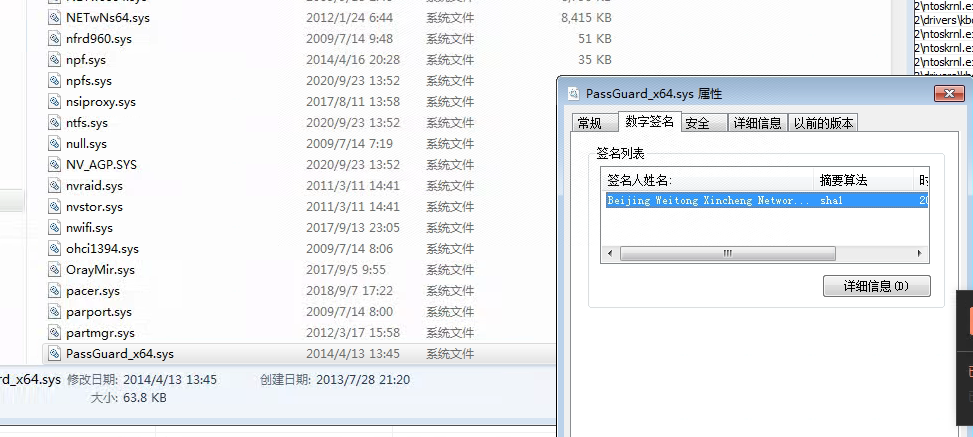
3. Rename User the thirdWedparty program File name and Reset physical machine.
Root cause
The thirdWedparty program keyboard hook Impacts the rvlsession Process hook and cannot obtain keyboard key messages normally.
solution
Rename User the thirdWedparty program File name OR uninstall the corresponding program.
Suggestions and Conclusion
When Odd OR a few PC clients Connected VM and the keyboard cannot be used OR is Error, it is basically caused by the physical machine environment. This method can be used to locate the problem.
Original Link
https://support.sangfor.com.cn/cases/list?product_id=26&type=1&category_id=13634&isOpen=true