
【aDesk】Abnormal use Error Nantian Highspeed camera
Problem Description
There is Mon Nantian Highspeed camera (1dfc:8713, 1dfc:8513) that works Connected Auto unlock after physical machine, but is Error (None screen) when used Auto unlock after VM VM
Effective troubleshooting steps
- Compare the driver information Medium VM Details see if there are any differences;
- Since this camera has two cameras, you need to check whether the Settings Medium VDC Connected;
- Connect the peripherals and View whether the corresponding administration and management information can be identified in the Details;
- Configure Settings Standard whitelist and camera list to perform corresponding list Test Connectivity to see if Connected;
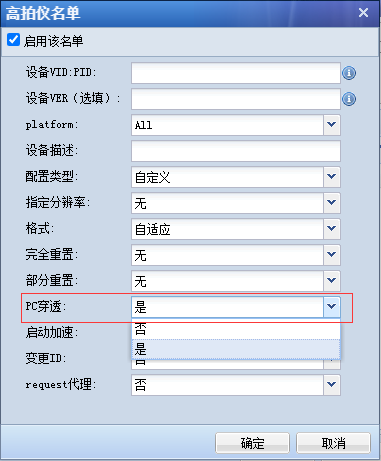
- Configure Settings Highspeed scanners. After Settings PC Penetration Auto unlock after list Highspeed scanners, Re-Login and Powered on
solution
Check PC Penetration Auto unlock after list Medium Highspeed cameras
Original Link
https://support.sangfor.com.cn/cases/list?product_id=26&type=1&category_id=11839&isOpen=true