
【aDesk】Abnormal use of Logitech C920 camera
Problem Description
538R2 Version, Logitech C920 camera is Error, it can be mapped but its supporting Software cannot Powered on
Process——
- Get the vid:pid of the Logitech camera: The physical machine uses the camera Connected. Auto unlock after the device manager of the physical machine, find the location of the Logitech camera, right-click – Type – Details – Hardware ID, and OK the VID:PID of the peripheral is 046d:082d
- Tested using 200 boxes, 500 boxes, and PC Log In vdi. All had problems, with screen delays. Using a physical machine Connected.
- Settings camera list for external devices. Log In Administrator Console, [vdi Settings] – [Policy Group], find the corresponding associated Policy group, and create a New camera list Auto unlock after [Virtual Desktop Policy] – [USB Device Access Control] – [Settings USB Exception list] – [Advanced Settings].
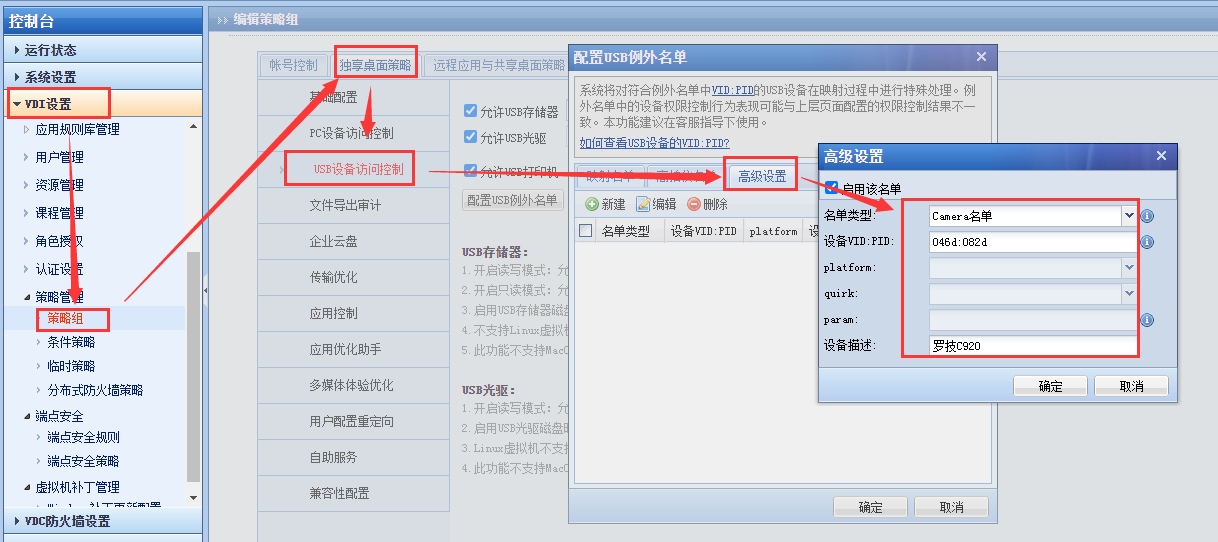
872985f42a1fb21aa6.png (93.27 KB) - , Settings list, Reset Auto unlock after VM in Administrator Console VDC console or VDC out of the box and then log in again to Re-Login Effective. It is found that the photo function Connected when using the Logitech Webcam Software comes with the Logitech camera, but Video is blurry.
- Use AMCAP to compare, the image quality Yes Connected, and there is no problem with the driver.
- Find the Process name of the Logitech Webcam Software Launcher_Main.exe, configure Settings DDRAW list, and after the step length is 1, it will display Connected
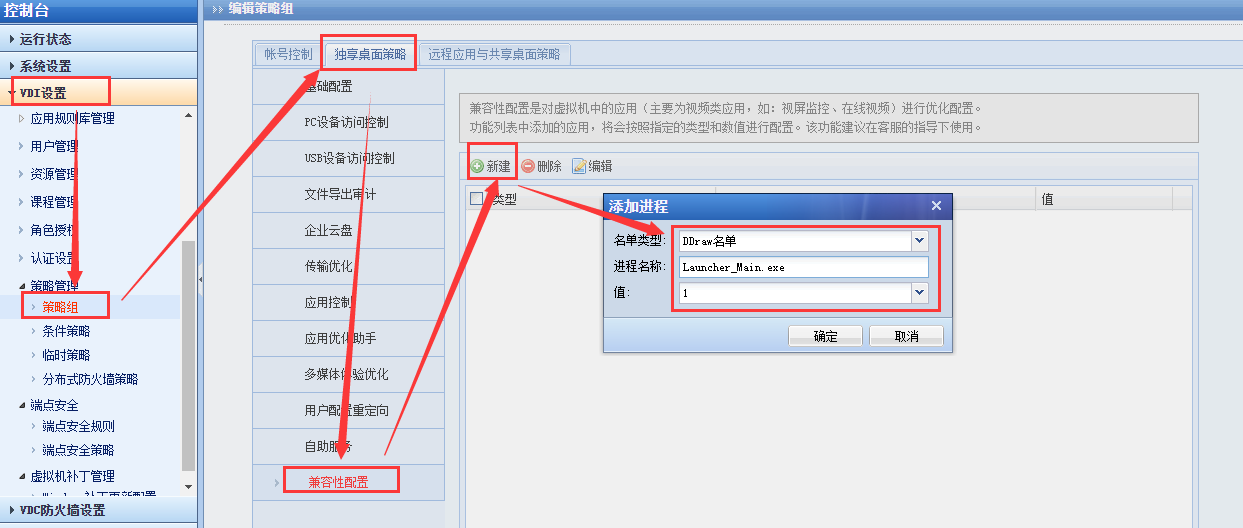
86985f42a3c70a8dd.png (74.16 KB)
solution
-
Settings camera list for peripherals
-
Settings DDRAW compatibility list for Software
Original Link
https://support.sangfor.com.cn/cases/list?product_id=26&type=1&category_id=10937&isOpen=true