
【aDesk】Abnormal use of some modules of ZW Construction Technology Simulation Training Software
Problem Description
There are abnormal usage of some modules of ZW Construction Technology Simulation Training Software.
Warning Information
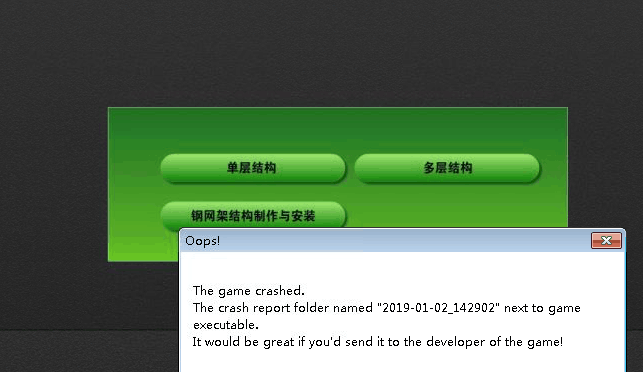
463725c374015a6451.png (125.1 KB)
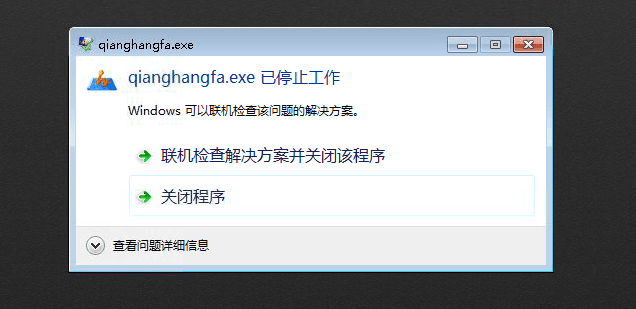
921765c37402f88655.png (111.01 KB)
Process——
- Start Running input %vdi% and press View agent Install directory, and rename VDHook.dll and VDHook64.dll
Unregister windows for VDHookbac.dll and VDHook64bak.dll and rerun Running program. If Connected, it is vdhook
Hook procedure caused. - Get the program process name and VM Settings. Settings Path as follows: New string Value, Name is the program process name, note the exe, for example, the ie Process is iexplore.exe
32characters long. system: HKEY_LOCAL_MACHINE\SOFTWARE\Sangfor\SSL\vdi\VDHook\ NotHookExeNa
64characters long. systems: HKEY_LOCAL_MACHINE\SOFTWARE\Wow6432Node\Sangfor\SSL\vdi\VDHook\NotHookExeName
After Settings Finish, remember to log out or Reset VM Test Connectivity it.
solution
- Add Error to the Registry.
Settings Path is as follows:
32characters long. systems:
HKEY_LOCAL_MACHINE\SOFTWARE\Sangfor\SSL\vdi\VDHook\ExplorerClassPro
64characters long. Systems:
HKEY_LOCAL_MACHINE\SOFTWARE\Wow6432Node\Sangfor\SSL\vdi\VDHook\ExplorerClassPro - Process acquisition method: Start the Task Manager, find the process name of the corresponding program, and add it to the Registry.
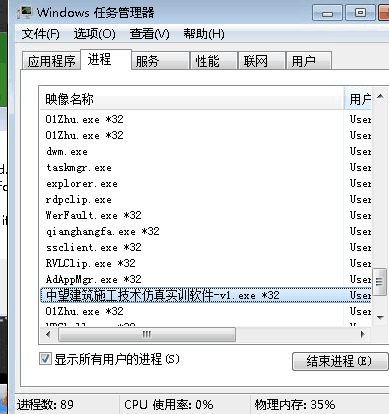
279325c3740d1511a8.png (32.72 KB) - New string Value, Name as the program process name, note the exe, for example, the ie Process is iexplore.exe
After the configuration is complete, remember to log out or restart the virtual machine to test.
Original Link
https://support.sangfor.com.cn/cases/list?product_id=26&type=1&category_id=10617&isOpen=true