
【aDesk_SBC Remote App】Failed start the program! The session Process Log Out Error
Problem Description
In the SBC Remote App scenario, when User Click App Resource, Tips error message appears: "Failed start the program" or "The session Process Error"
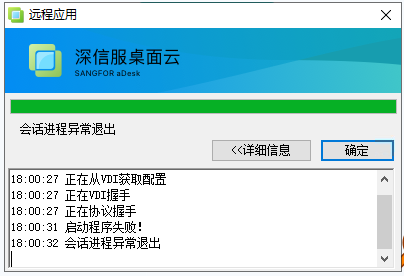
Warning Information
"Failed start program"
"Session Process Error"
Effective troubleshooting steps
View RD Licensing diagnostics on app server
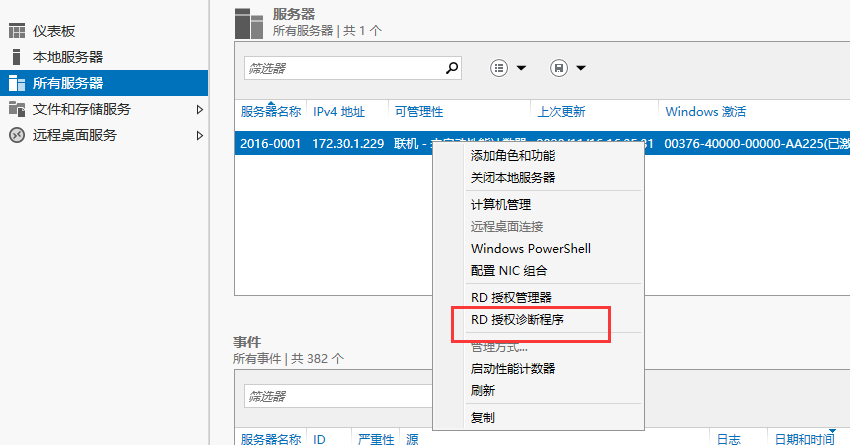
I found that the RD Licensing Mode is "Every device" and needs to be Change to "Every User" before I can use Remote App
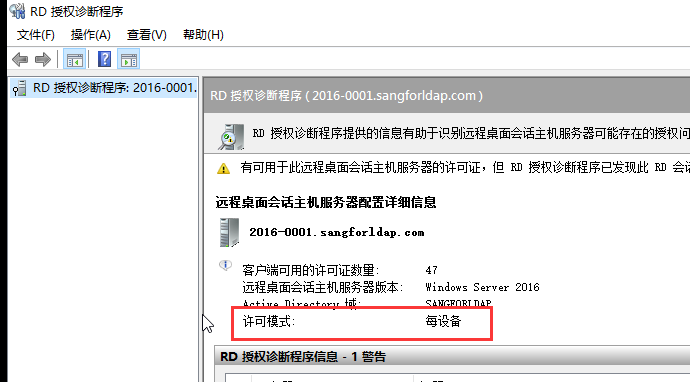
Root cause
The RD Licensing Mode of app server Error and needs to be changed to "per User" instead Yes "per device"
solution
If Yes domain environment, you can Auto unlock after Policy to app server in the AD domain, and Auto unlock after "per User" in Computer Settings-administration and management Template-Windows Components-Remote Desktop Service-Remote Desktop Session Host-Licensing-Settings Remote Desktop Licensing Mode; in a non-domain environment, you can Change directly Auto unlock after group Policy app server
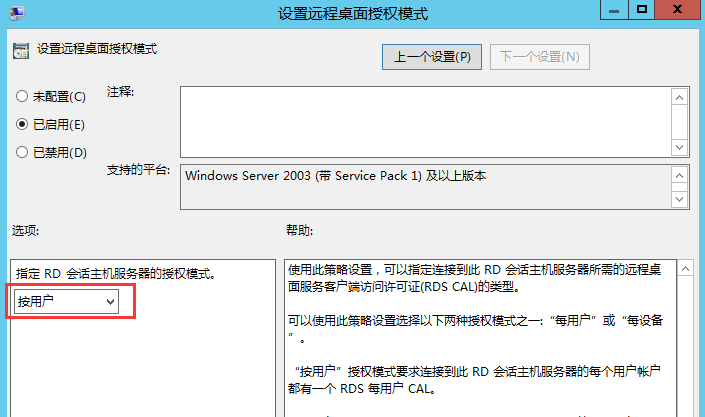
Suggestions and Conclusion
In the SBC scenario, Mode Licensing mode must be "Every User" instead of "Every device", and the purchased Microsoft RD Licensing must also be in "Every User" Mode
Original Link
https://support.sangfor.com.cn/cases/list?product_id=26&type=1&category_id=11845&isOpen=true