
[adesk] File Export Tips “Unable to write data to the client disk, please Select Export to Other disk”
Problem Description
File Export audit Tips "Unable to write data to this client disk. Please Select Export to Other disk."
Warning Details
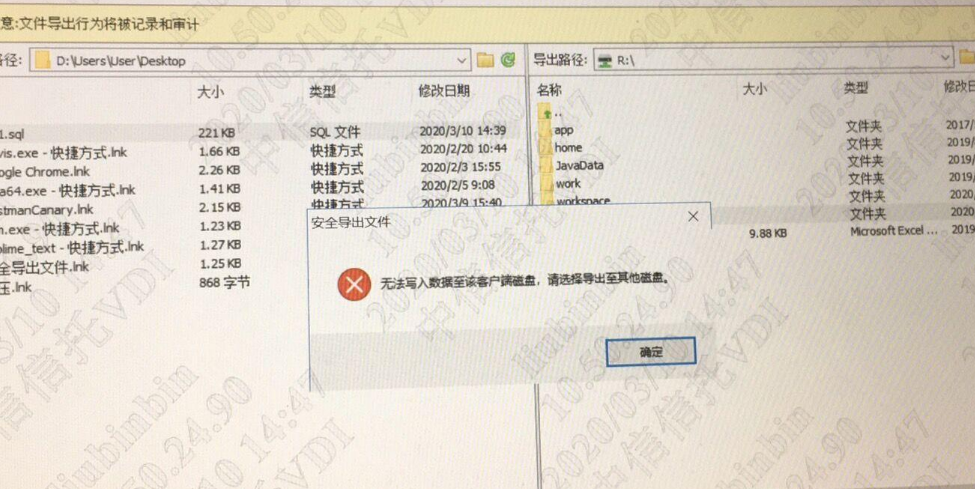
Process——
- When using the File Export audit function, an error will be reported;
- Replace the physical computer to Log In VM and Powered on File Export function normally;
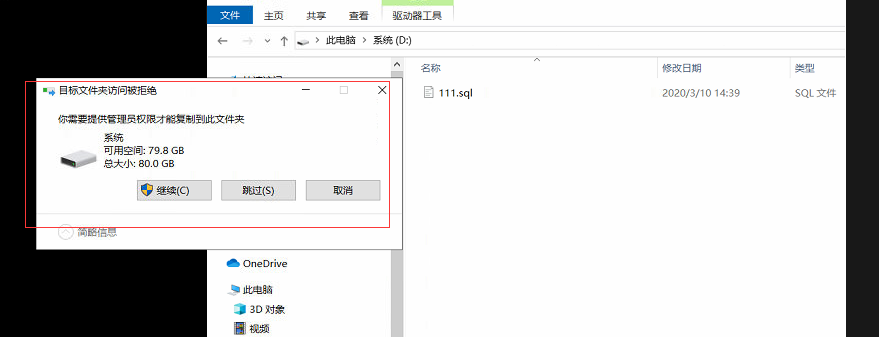
- It is found that you always need to click authorization to write data Click Licensing;
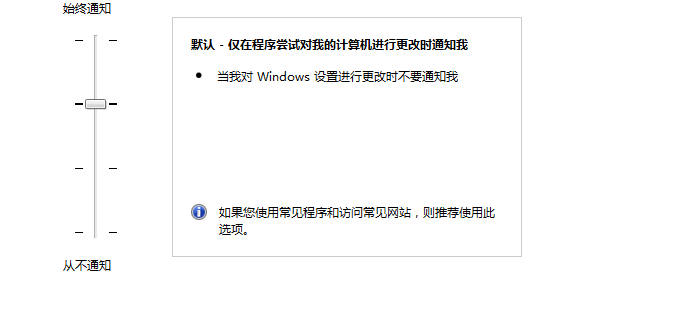
- Auto unlock after the setting to no prompt in [Control Panel Home] – [System and Security] – [Change User Account Control Policy];
Root cause
Every time you Export File, the physical computer will Tips that administrator privileges are Role to Operation, but the OK button Yes not pop up Auto unlock after virtual machine interface.
solution
Auto unlock after [Control Panel Home] – [System and Security] – [Change User Account Control Policy]Medium Change to not Tips.
Original Link
https://support.sangfor.com.cn/cases/list?product_id=26&type=1&category_id=10880&isOpen=true