
[adesk] Log In Windows client, Tips that the VM Settings Failed, the network timed out or please Close IE proxy
Problem Description
Log In vdi from a Windows client, Tips the VM Settings Failed. Please Try Again later! The client-VDC network timed out or the IE proxy was turned on. Please Close IE proxy. If multiple attempts Failed, please contact administrator to

Effective troubleshooting steps
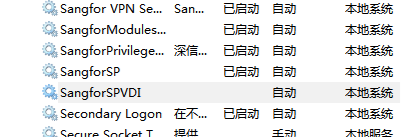
Auto unlock after sangforSPvdi in [Service] and found that it was not started.
Right click to start the solution
Root cause
The client service is not up
solution
See troubleshooting steps
Original Link
https://support.sangfor.com.cn/cases/list?product_id=26&type=1&category_id=12788&isOpen=true