
[aDesk] The Policy pushed by the domain control policy does not Effective on the aDesk vdi VM
Problem Description
Passed disk mapping Policy pushed by the domain control Policy to the aDesk vdi VM does not Effective, while the physical machine Connected
Warning Information
Effective troubleshooting steps
- Check whether VM domain Connected.
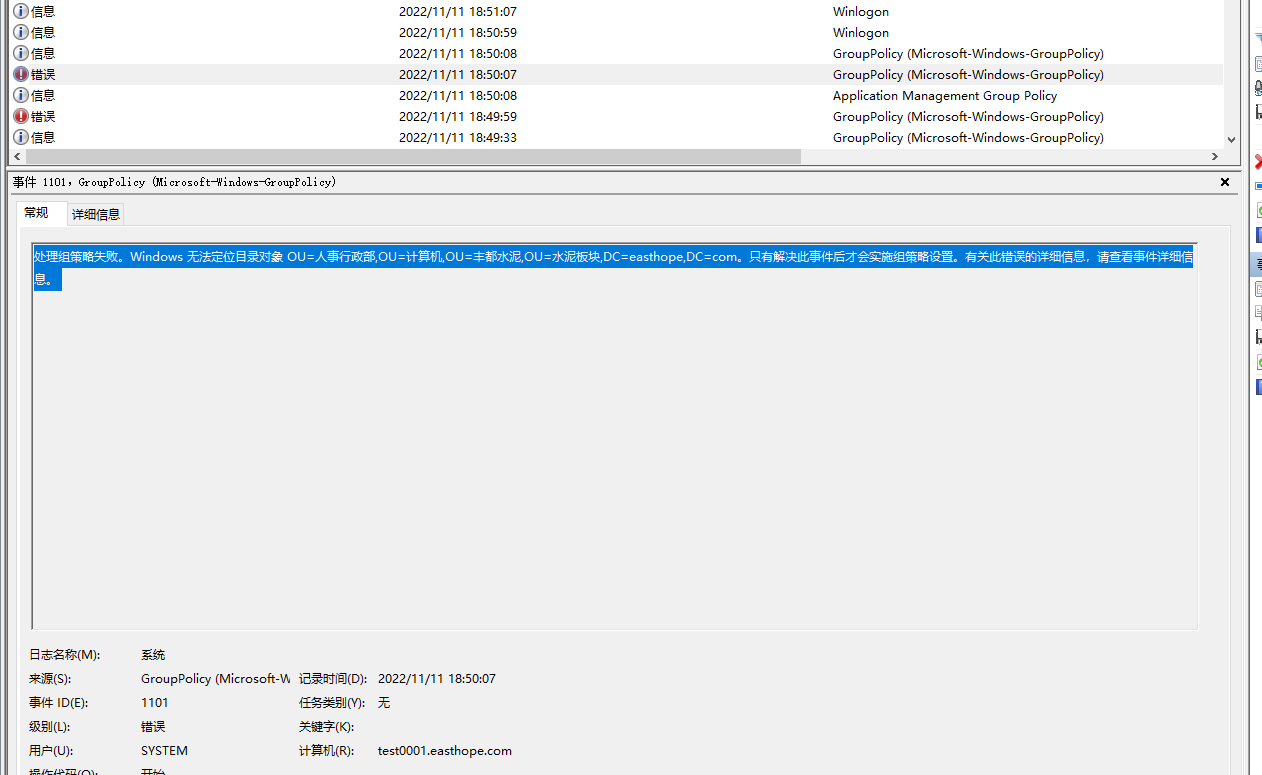
- View System Logs log to see if the domain control Policy Connected
- System Logs error: Failed process group Policy. Windows cannot locate the directory Object OU=Personnel Administration Department,OU=Computer,OU=Fengdu Cement,OU=Cement Sector,DC=easthope,DC=com. The Group Policy Settings will not be implemented until this event is resolved. For Details about this Error, View event Details.
Root cause
The OU Role issue VM is located
solution
Refer to the link on the right to Settings Role and Connected. Link: https://blog.51cto.com/5ihutang/4661440, Click jump
Is Yes temporary solution?
No
Suggestions and Conclusion
For domain control issues, first View VM and Service machine and domain control serverSystem Logs
Original Link
https://support.sangfor.com.cn/cases/list?product_id=26&type=1&category_id=13589&isOpen=true