
[adesk] VM cannot be powered Powered On. The host has insufficient non-huge page Mem Usage Resource and cannot start the VM.
Problem Description
VM cannot be started temporarily. Please Try Again later. | [host-b4055 45d0787] The host has insufficient non-huge page Mem Usage Resource and cannot start the VM. This may be caused by the following Cause: 1. Too much large page Mem Usage is reserved, resulting in insufficient non-huge page Mem Usage. 2. Starting the VM requires more Mem Usage than the host can Settings. 3. Starting the VM requires more Mem Usage than the remaining Mem Usage.
Warning Information
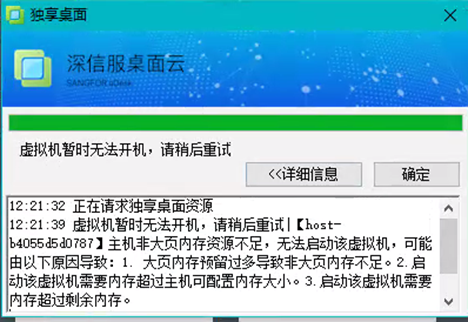
986855f6af888b8c24.png (200.01 KB)
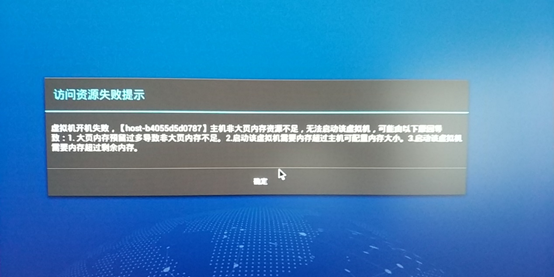
621425f6af8929ba73.png (289.81 KB)
Process——
VM turns on "Enable huge-page memory"
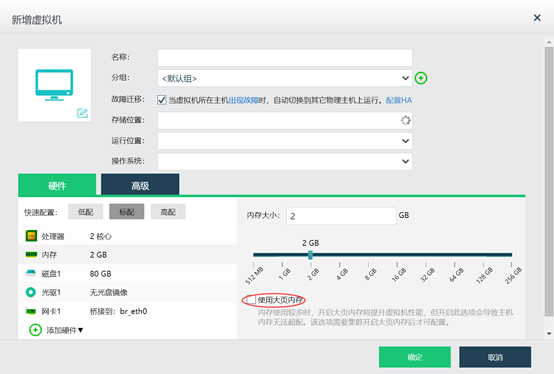
110155f6af8980fe1a.png (52.97 KB)
Root cause
The "Enable huge-page memory" function has been added since VMP5.4.0R2, and the system limits the Enabled large page Mem Usage. If VM does not Enable huge-page memory function", the VM cannot be started when the limit ratio is reached.
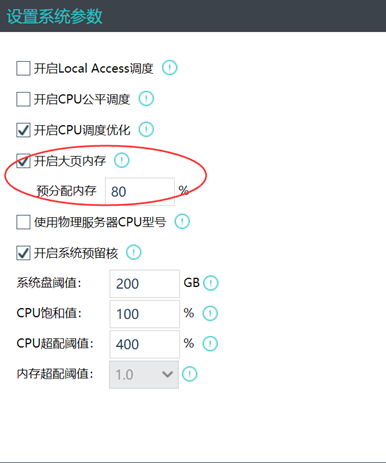
71965f6af89ec854b.png (55.84 KB)
solution
Method Mon: Edit – VM – Mem Usage – Enabled "Enable huge-page memory"
Method Tue: administration and management System Settings – Close "Enable Large Page Mem Usage" (Close requires Reset the host)
Suggestions and Conclusion
Version version 5.4.0R2, Default "Use large page VM" option Yes not checked Enable huge-page memory
Default New VM Version 5.4.5 Yes check "Enable huge-page memory"
Original Link
https://support.sangfor.com.cn/cases/list?product_id=26&type=1&category_id=10979&isOpen=true