
[aDesk] When Add Count of derived VM in the created Resource, the Tips “The same Running location and Datastore cannot be Add, please reselect OR Cancel”
Problem Description
When Add the Count of derived VM to the Create Resource, a message appears Tips "The same Running location and Datastore cannot be Add. Please reselect OR Cancel."
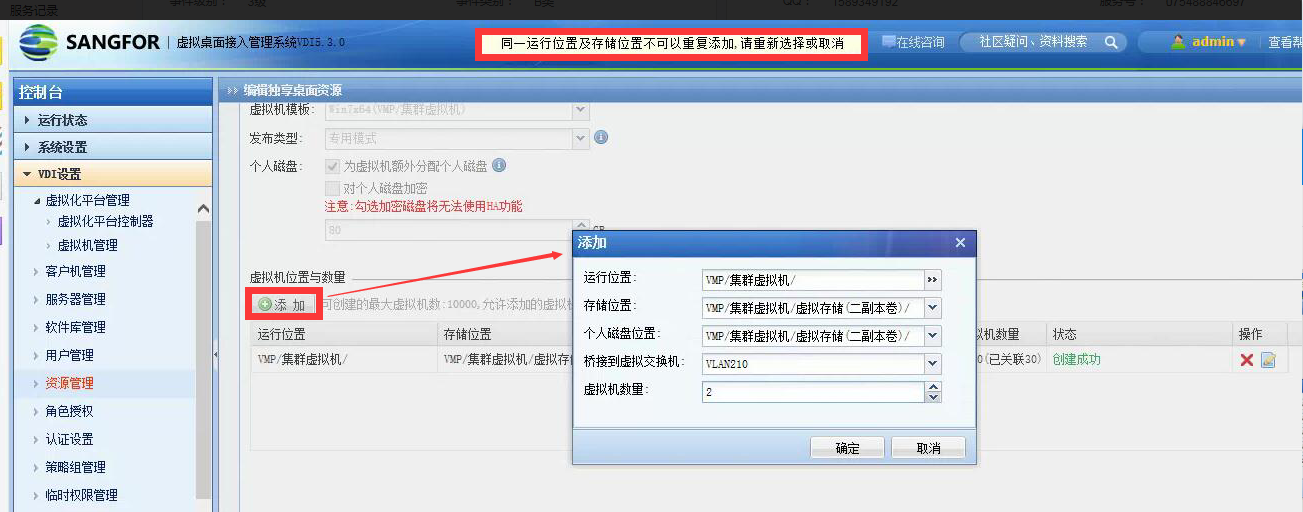
267845bd84b03b7772.png (381.26 KB)
Root cause
You cannot Add derived VM Policy with the same Datastore AND Running location under Mon same Resource. If you need to add derived VM data under an existing resource, you can only Edit the existing Resource or Select different Running location and storage location to derive the VM.
solution
Auto unlock after existing Resource, Edit Resource and Change number VM to the Count of Successful derived VM plus Count Count of VM that need to be derived.
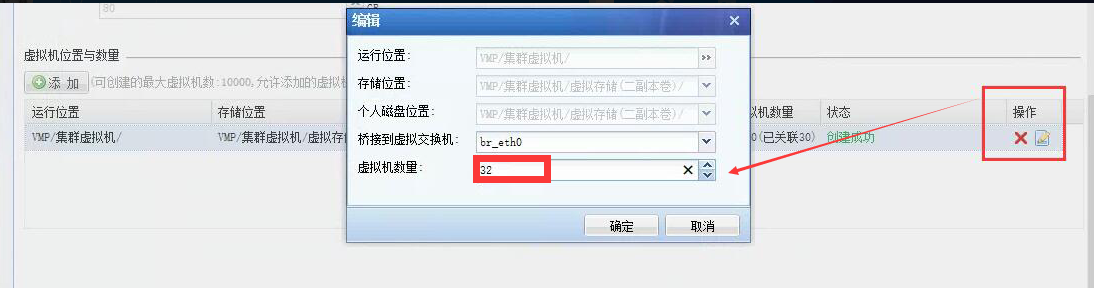
44545bd84c300c39a.png (160.08 KB)
Original Link
https://support.sangfor.com.cn/cases/list?product_id=26&type=1&category_id=10547&isOpen=true