
[adesk] When publishing a multi-session remote application on a non-winserver, the Tips “Path” appears when Open App
Problem Description
When a non-winserver publishes a multi-session Remote App, the prompt "Path" Tips Open the App
Warning Information
Auto unlock after Open Remote App on the client, Open Remote App cannot be opened and a prompt "Path" Invalid Tips
Effective troubleshooting steps
- The principle of non-winserver multi-session Remote App Yes basically the same and that of winserver multi-session Remote App, and it also Yes RDP Protocol. The troubleshooting method AND Mon same as that of winserver multi-session Remote App.
- First check whether the App is Install in the User directory on the server. Remote App require multi-User access and cannot be Install in the User directory.
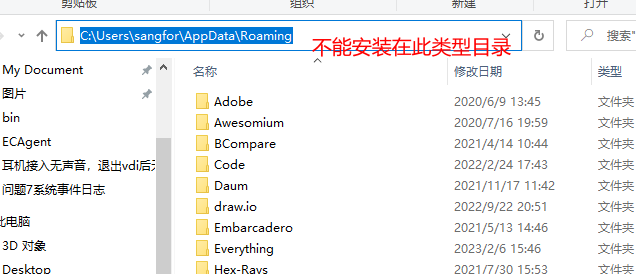
- After using the vditoolname tool to obtain the User name and Password, check whether User corresponding user can Open corresponding app server on the application App
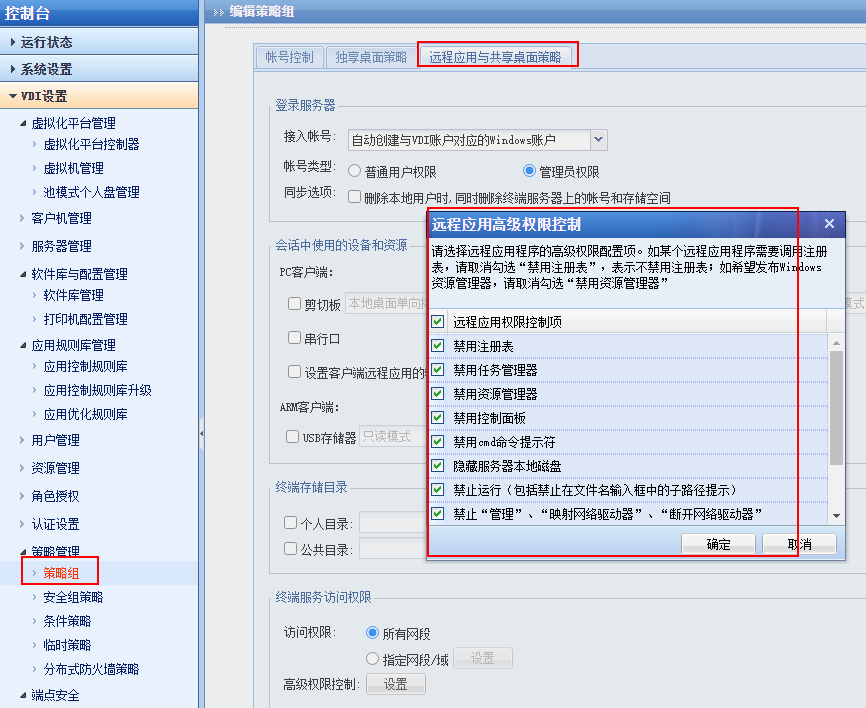
- Check whether the Policy Settings on the VDC Disabled corresponding User access Role. Restricting Role may cause User to have no Role Open corresponding directory, thus being unable to Open App
Root cause
Publishing multi-session Remote App non-winserver is basically the same AND publishing Remote App on winserver. However, due to system differences, different problems may occur with the same Settings.
solution
Check the App Install location and Policy Role control
Original Link
https://support.sangfor.com.cn/cases/list?product_id=26&type=1&category_id=13762&isOpen=true