
[adesk] Win7 restore Mode VM Mon Tips it needs to be Reset Update
Problem Description
5410R1, the Template-derived restore Mode VM will always Tips that the computer must be Reset to App these changes
Warning Information
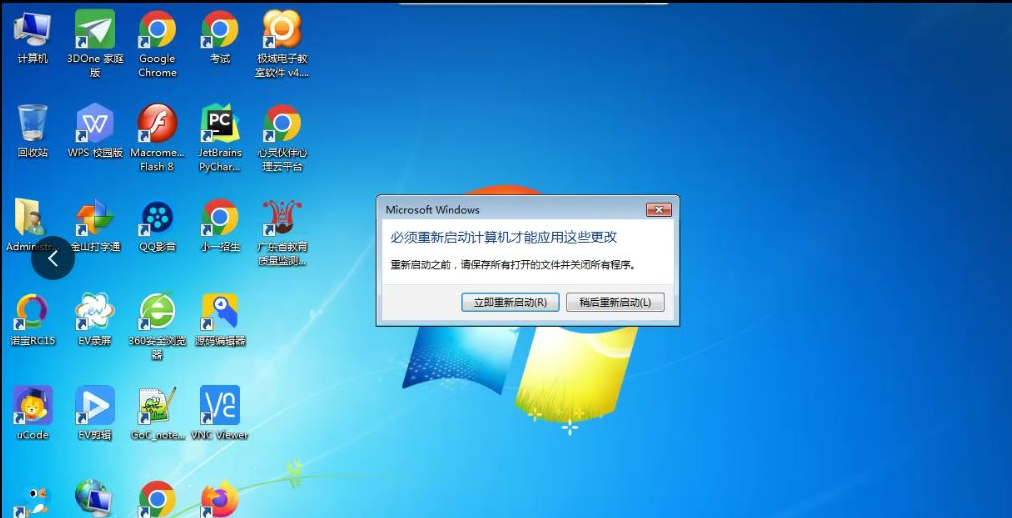
Effective troubleshooting steps
After Reset, View the Operation Above this phenomenon occurs, and you can see that the fastio driver Install the system.
Comparing the derived VM and Template, we can see that Template has only Mon disk, while the derived VM has two disks.
Make the derived VM not generate a Personal Drive, not Install fastio driver, and not Popup Reset
Root cause
The derived VM system Install the fastio driver installed, and a pop-up window appears indicating that a hardware device has been changed and a restart is Reset
The restore Mode virtual machine will be restored every time, so VM will be Reset every time it is restarted, and Mon will always Tips that a restart is Reset
solution
Root cause solution:
- Change the Template (take Mon win7 to verify that there is no such problem, and the derived VM will not Install fastio driver)
- Make the derived VM not generate a Personal Drive, the derived VM will not Install fastio driver and will not Tips Reset
Workaround:
- Add Mon small program to intercept this pop-up window when the Popup. This will block the window and prevent User Operation Reset. However, the window will flash.
The usage is as follows:
(1) Download the Download package provided by the Service and unzip it to the Template C:\Program Files (x86)\CloseWindow directory
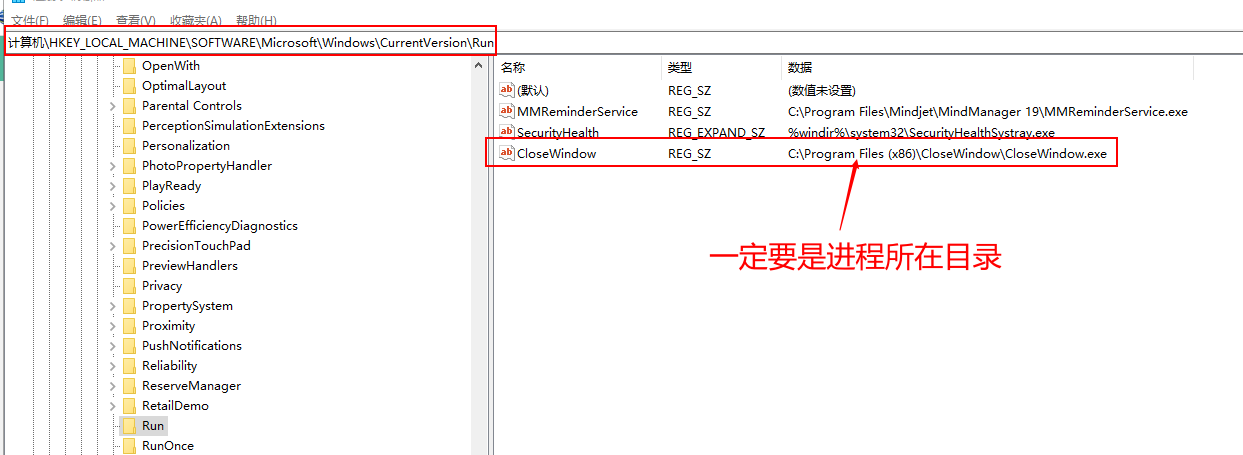
(2) Open Registry and locate
Computer\HKEY_LOCAL_MACHINE\SOFTWARE\Microsoft\Windows\CurrentVersion\Run
(3) RightAuto unlock afterClick in the Blank on the right and New string Value CloseWindow, then fill in the Above decompressed Process into the content
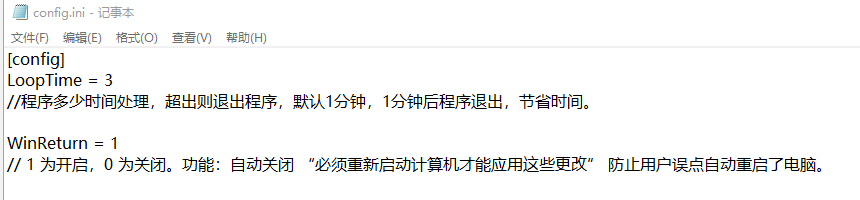
(4) This interception program provides two control switches. You can see Passed the config.ini Settings document Medium the attachment that if you need to Change interception Time or Close interception, you can control it Passed Settings File.

CloseWindow.zip
(314.79 KB)
Original Link
https://support.sangfor.com.cn/cases/list?product_id=26&type=1&category_id=12600&isOpen=true