
[VDI] Cannot Open mstsc.exe as Remote Application
Issue Description
The remote application resource mstsc remote desktop resource was released, but an error reported when it was opened, and the server rejected.
Error/Warning Information
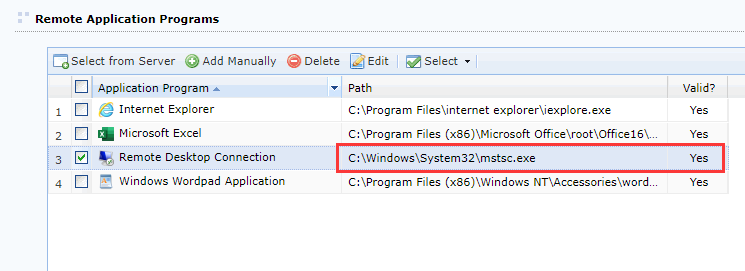
- The validity is marked as ‘Yes’ when added.
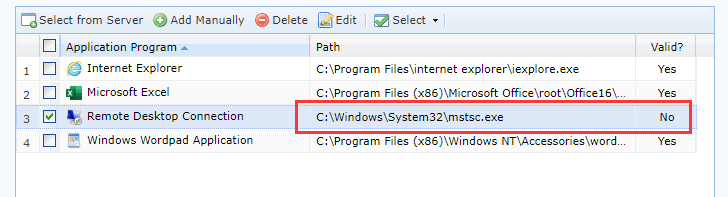
- After failing to open the remote app (mstsc.exe), the validity changes to ‘No’.
Handling Process
- Due to certain circumstances, the RDP protocol needs to be used, so it is mandatory to change the server protocol to RDP.
- Create a registry key named ‘ForceUseRdp’ as a ‘REG_DWORD’ under the registry path:
HKEY_LOCAL_MACHINE\SOFTWARE\Wow6432Node\Sangfor\SSL\SRAPServer\SRAPSrvSet the value to ‘1’ and restart the agent service after modification.
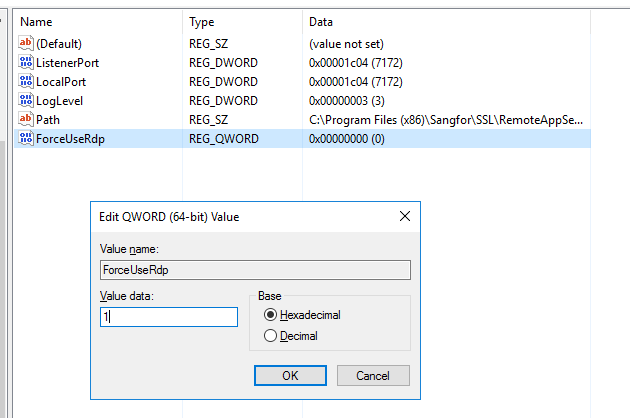
- After completing the modification, the issue was not resolved.
- It was then discovered that ‘mstsc’ needed to be deleted from the registry to release it.
- Enter regedit in the remote application server [Start]-[Run] to open the registry. Find ‘mstsc.exe’ under
HKEY_LOCAL_MACHINE\SOFTWARE\Sangfor\SSL\RemoteAppServer\RemoteAppApiHook\NotAllowProListnode. Right-click ‘mstsc.exe’ [Delete]. - Restart the agent service after modification.
Root Cause
Change the server protocol to RDP protocol.
Solution
When publishing the remote application resource ‘mstsc.exe’, you need to delete ‘mstsc.exe’ from the registry to access successfully. In some cases, if access is still not possible, you may need to configure the remote desktop to use the RDP protocol in the group policy.
Suggestions
Note: It is recommended to create a backup of the registry if you are not familiar with it.