
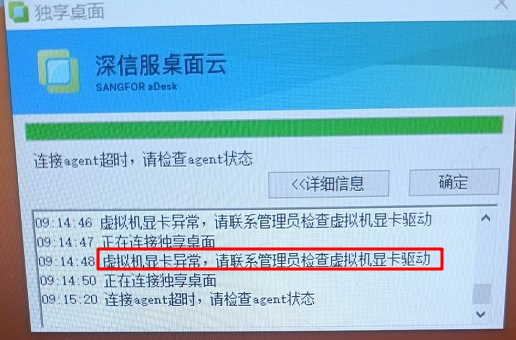
[vdi] Connected vdi client accesses the win10-2D VM, Tips VM graphics card Error. Please contact administrator to to check VM graphics card driver
Problem Description
Connected vdi client accesses a 2D VM, Tips VM graphics card Error. Please contact contact administrator to to check the VM graphics card driver (note that it is not only 3D that has a graphics card, 2D Mon has a graphics card, Yes the qxl display device of VM)
Effective troubleshooting steps
- First, check the agent Status to Tips. The agent status on the virtual machine Connected and the agentcheck result is also Connected;
- View VM log, especially the RVLAgent log. The following log record: There is no qxl display device

- After sorting out the logic of RVLAgent, it was found that when there are Fri qxl devices, RVLAgent will pass the Details there is no graphics card to the client, and then the client will report the error Medium the corresponding output problem phenomenon;
- Check the device manager and find that the display device Connected and there are two qxl devices;
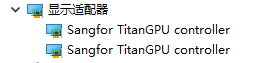
- Because Medium device Status in the device manager Connected, it is necessary to further analyze the Cause RVLAgent cannot recognize the qxl graphics card. After adding logs, it is found that the graphics card description recognized by RVLAgent does not have the sangfor Class, but only has the TitanGPU controller Class, while the recognition logic requires the sangfor Class, which results in the failure to recognize the qxl graphics card;
- Check Connected environment. The Description the qxl graphics card device should be Sangfor TitanGPU controller. The same is true for the device Description.
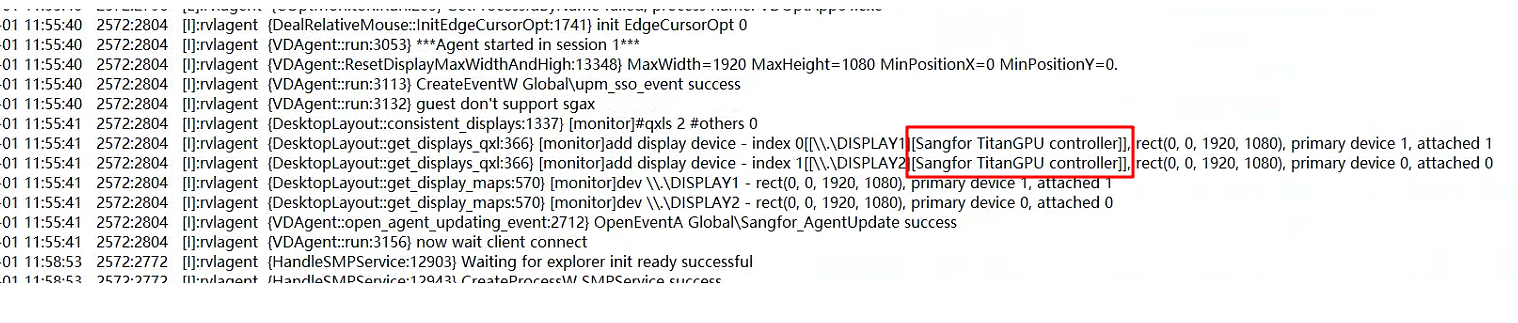
- Reset Auto unlock after Delete the display device (the platform will plug in the graphics card again after Reset), and it will work normally after updating the graphics card driver
solution
You need to uninstall the device and then re-Update driver. For details, see the Operation document:
vdi client Connected 2D VM Tips graphics card Error solution.docx ( 1.71M )
Original Link
https://support.sangfor.com.cn/cases/list?product_id=26&type=1&category_id=26909&isOpen=true