
[VDI] Failed to reinstall VM vdi agent after unistalled VDI agent on Windows VM control panel.
Issue Description
Failed to reinstall VM vdi agent after accidentally uninstalled VDI agent on Windows VM via control panel.
Error/Warning Information
- This solution only applicable for those user that had accidentally unistalled the Window VM VDI agent from the control panel instead of uninstalled via the proper way.
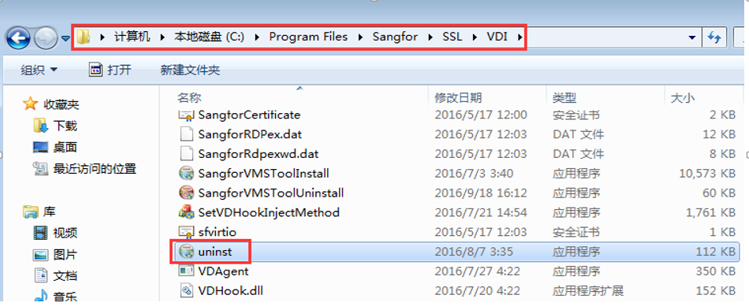
- In order to unistall vdi agent on VM properly, it willrequired user to access to directory via pathway [Computer/Local C:/Program Files/Sangfor/SSL/VDI/]. And execute the program [unist.exe] to uninstall the vdi agent properly.
Handling Process
- When trying to reinstall VDI agent on VM, error prompted out and the installation activities has been terminated.
- Found that user uninstall the VDI agent via windows control panel instead of using the VDI agent unistallation program.
Root Cause
Due to improper VDI agent uninstallation step, resulting VM unable to remove the residual file of the VDI agent on the VM.
Solution
Solution for older VDI version
-
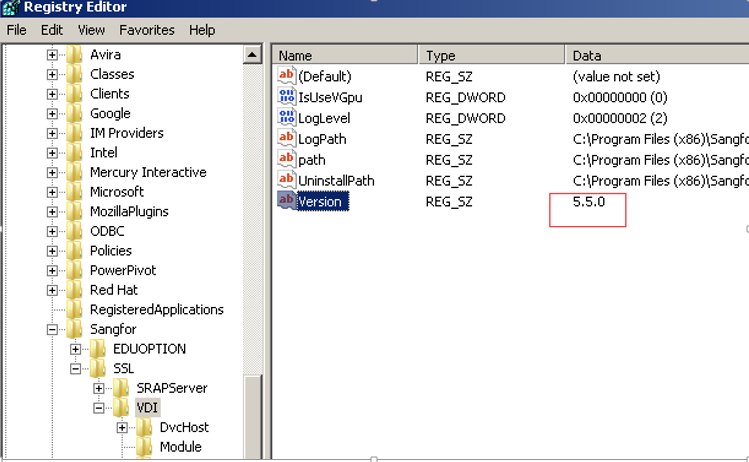
Go to Window regedit, check the agent version through the registry.
Path: HKEY_LOCAL_MACHINE\SOFTWARE\Wow6432Node\Sangfor\SSL\VDI\Version -
If the version is 5.3.8.2245, kindly get a vdi agent of version later than version 5.3.8.2245. (5.4.2, 5.4.5, 5.5.0).
-
Install the new vdi agent (5.4.2, 5.4.5, 5.5.0) to the respective VM. VM reboot is required.
-
After reboot the VM, the new vdi agent shall be installed on the VM, uninstalled the vdi version properly via directory pathway [Computer/Local C:/Program Files/Sangfor/SSL/VDI/]. And execute the program [unist.exe]. Again, VM reboot is required.
-
After reboot the VM, kindly reinstalled the correct version of vdi agent to the VM based on the VDI version. After reboot the VM, the vdi agent reinstallation will be completed.
Solution for latest VDI version
-
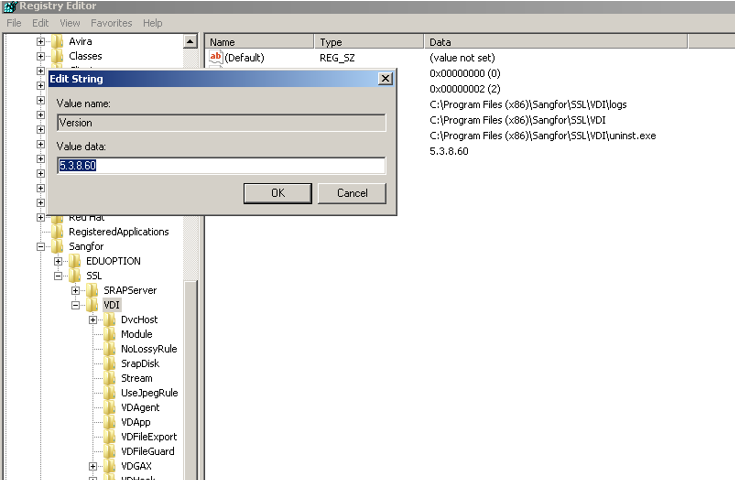
If the firmware version of the vdi client was using the latest VDI version, it will require to changes the version value of the Version [REG_SZ] to older version, in this scenario, change the Version value from 5.5.0 to 5.3.8.
-
Download the vdi agent version 5.5.0 and proceed with the installation. VM reboot is required.
-
After reboot the VM, the new vdi agent shall be installed on the VM, uninstalled the vdi version properly via directory pathway [Computer/Local C:/Program Files/Sangfor/SSL/VDI/]. And execute the program [unist.exe]. Again, VM reboot is required.
-
After reboot the VM, kindly reinstalled the correct version of vdi agent to the VM based on the VDI version. After reboot the VM, the vdi agent reinstallation was now completed.
Suggestions
N/A