
[VDI] Install VDI Client not responding/freezes
Issue Description
User installs VDI Client on Windows and found that the installer has no progress even after running for over 30minutes.
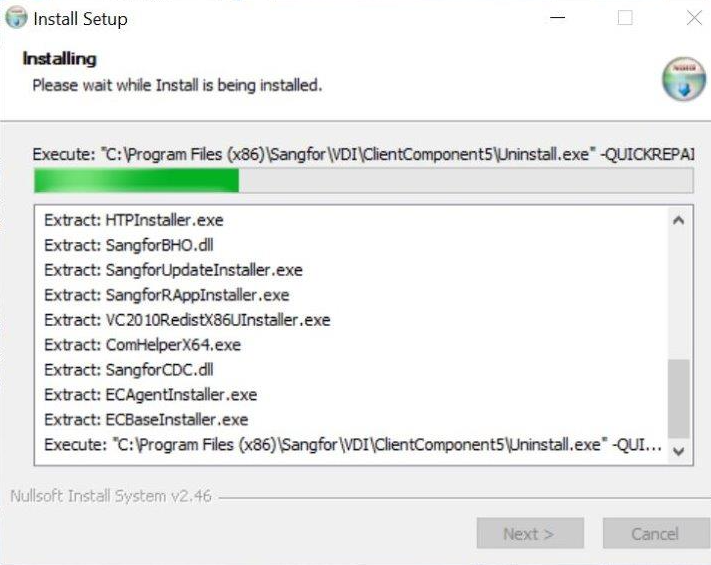
Installer freezed on the progress "ClientComponent\Uninstall.exe -QUICKRECOVER"
Error/Warning Information
Handling Process
-
Check for antivirus on the PC, none found.
-
Install VDI tool and enter ‘Expert Debug mode’ then open debug view and run installer again to view installation process.
-
From debug view, found that there is signature related error. Requires to disable Windows Driver Signature verification to continue installation.

-
Client feedback another PC not able to install VDI Client althought disabled Windows Driver signature verification.
-
Entered debug view again to view the process logs.
-
Found that the following error is reported "[Error] add trusted site result: 1"

-
The process before this error is accessing firefox profile (Tor browser), so we suspect this is related to Tor browser restriction in writing trusted sites.
-
Temporarily remove the Tor browser from the PC.
ref: https://tb-manual.torproject.org/uninstalling/ -
Able to install VDI Client normally after uninstalling Tor browser.
Root Cause
- Windows Driver Signature verification not allows to install unsigned package.
- Tor browser restriction on writing into profiles.
Solution
-
Disable Driver signature verification.
https://answers.microsoft.com/en-us/windows/forum/all/permanent-disable-driver-signature-verification/009c3498-bef8-4564-bb52-1d05812506e0 -
Remove Tor browser.
https://tb-manual.torproject.org/uninstalling/