[VDI] macOS Installed VDI Client but Keep Prompting Download VDI client
Issue Description
When logging into VDI on macOS using Google Chrome (version 84.0.4147 and above) or Safari (version 14.0 and above), users are repeatedly prompted to download the VDI client again.
Handling Process
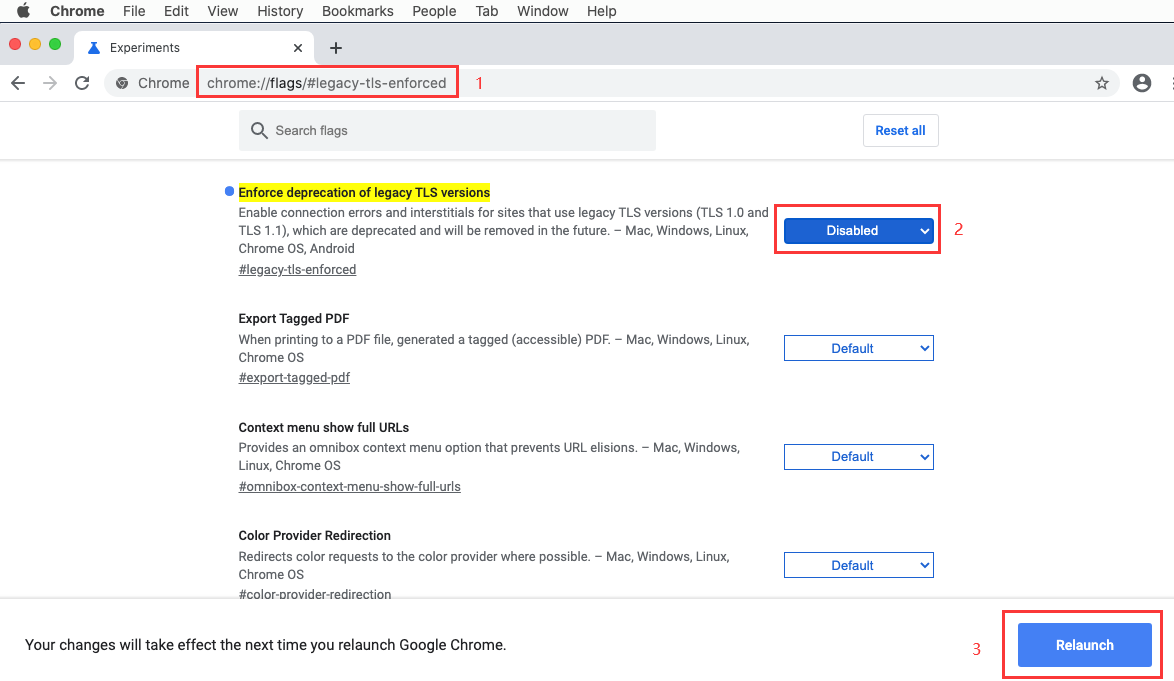
- Access chrome://flags/#legacy-tls-enforced
- Disable the Enforce deprecation of legacy TLS versions
- Relaunch the browser
Root Cause
The latest versions of Google Chrome and Safari detect that TLS 1.0 and TLS 1.1 are insecure and require the use of the TLS 1.2 protocol. However, the current VDI client uses TLS 1.0 and 1.1, which causes the login to fail when using Google Chrome or Safari, as the connection is considered insecure and is therefore forbidden.
Solution
Disable the Enforce deprecation of legacy TLS versions in the browser.