
[VDI] MacOS Safari Keeps Redirects To Download VDI Client
Issue Description
MacOS log in to VDI via Safari browser (version 14.0 and above), and keep being redirected to download the VDI Client. Even though the VDI Client has been installed.
Handling Process
-
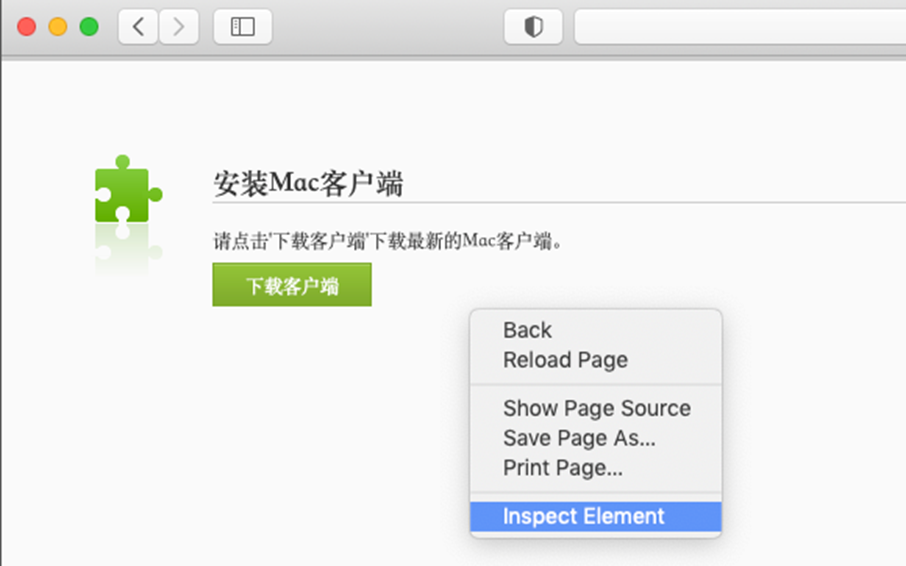
On the website, right click to Inspect Element.
-
Retrieve the URL from the Summary.
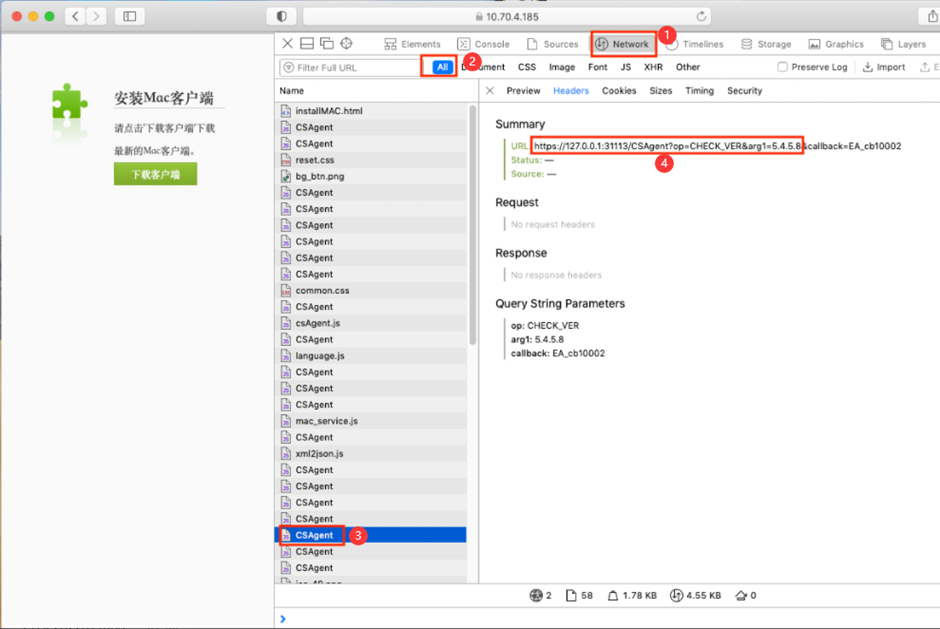
a. Go to Network.
b. View All.
c. Click on the CSAgent.
d. Copy the URL https://127.0.0.1:31113/CSAgent?op=CHECK_VER&arg1=5.4.5.8 only. URL may vary in a different environment.
NOTE: the &callback=EA_cb10002 at the end of the URL is not required. -
On Safari, open a new tab and visit the copied URL, then Trust the URL. The download redirection should have been resolved.
Root Cause
Because the IP 127.0.0.1 was not trusted, so the request was denied.
Solution
Refer to the handling process.
Suggestions
If the scenario varies from above or the solution doesn’t work, kindly consult specialist or R&D for further verification.